
MDM vs. EMM for Android: What Your Team Actually Needs
MDM is device policy and EMM adds app management. Judge an Android console by the management set, the five-minute reset, and the 270-day offline limit.
MDM is the device-policy layer and EMM adds app management. The handset is a diagram with a centered camera hole, one centered USB-C port, and a blank bottom.
Enrollment fails, and the handset is factory reset, when an Android Management API device stays unlinked to a policy for five minutes. MDM is the device-policy feature set. EMM is the product that combines those features with app management.
Start from the Enterprise Android collection and write down who owns the phone before you compare console labels.
MDM, on the Android Enterprise terminology page updated 2026-09-17 UTC, is a set of features for managing device policies. MAM is a set of features for managing mobile apps. An EMM provides both. NIST SP 800-124 Rev. 2, published May 2023, describes EMM as the solution that deploys, configures, and manages mobile devices, and it says EMM is sometimes called UEM. The Android management set still comes first. The provisioning guide updated 2026-08-04 UTC prints Android 5.1 or later for a personally owned work profile, Android 8 or later for a company-owned work profile, and Android 5.1 or later for work-only management. The overview updated 2025-08-28 UTC prints Android 5.0 or later for a fully managed device. Those floors, the five-minute factory reset, and the 270-day offline limit are the checks a console has to survive.
Scroll horizontally to see all columns.
| Input or item | Printed figure or source | Why it matters |
|---|---|---|
| MDM | Device-policy features. Terminology, updated 2026-09-17 UTC | The name stops at device policy |
| MAM | App-management features. Same page | App control is a separate feature set |
| EMM | A provider that combines MDM and MAM. Same page | The product claim is the combination |
| UEM | NIST SP 800-124r2, May 2023, section 4.2.1: EMM is sometimes called UEM | The extra name still needs an Android result |
| Personal work profile | Android 5.1 or later. allowPersonalUsage = PERSONAL_USAGE_ALLOWED. Provisioning guide, updated 2026-08-04 UTC |
Personal apps stay outside the work profile |
| Company work profile | Android 8 or later on that guide. Same token value | devices.delete and device commands hit the whole handset |
| Work-only management | Android 5.1 or later on the provisioning guide. Overview, updated 2025-08-28 UTC, says Android 5.0 or later for a fully managed device | Keep both floors. They come from two pages |
| Dedicated device | Userless token PERSONAL_USAGE_DISALLOWED_USERLESS. Sign-in URL is not suitable. Granular lock-screen control is Android 6.0 or later on the overview |
A non-userless token asks for a work email |
| Unlinked enrollment | Five minutes, then enrollment fails and the device is factory reset | A missing policy is a reset |
| Offline streak | 270 consecutive days, then reprovision | A spare that never checks in leaves management |
| Token lifetime | One hour by default. Figure 1 uses 1800 seconds and states 30 minutes | Setup after expiry needs a new token |
| Policy catalog | Over 80 device and app policies. Overview | A name in that catalog still has to exist for your set |
| Directory gate | More than 500 devices: all standard features of at least one solution set. Feature list, updated 2026-07-10 UTC | Commercial-availability rule for the EMM product |
| Intune app protection on Android | Company Portal is required on the device. Page updated 2026-04-14 | An unenrolled phone still needs that app |
| API project quota | A quota system exists. The number of devices is not printed | Request the initial quota before the first provision |
| Price | No saved page prints a price | |
| Customer license minimum | No saved page prints one |
MDM is device policy and EMM combines it with apps
Google’s terminology, updated 2026-09-17 UTC, keeps the words short. Mobile device management is a set of features for managing device policies inside an organization. Mobile application management is a set of features for managing mobile apps. Enterprise mobility management is the solution provider that combines those two.
The Android Enterprise overview, updated 2025-08-28 UTC, then names the three pieces that have to be present for that combination to run: the EMM console, Android Device Policy, and managed Google Play. Android Device Policy is the app installed during setup. It applies the policies from the console. Managed Google Play is the store on the managed device, and the user can install only the apps the organization approves.
NIST SP 800-124 Rev. 2, dated May 2023 and final on the CSRC record as 17 May 2023, draws a wider circle in section 4.2.1. EMM is a solution used to deploy, configure, and actively manage mobile devices. The publication says an EMM suite may encompass MDM, MAM, mobile threat defense, and other management technologies. The same sentence says EMM is sometimes referred to as UEM, unified endpoint management. Section 4.1.3 adds a platform limit: most device platforms permit only one MDM solution to control the management APIs.
Microsoft Intune’s own page, updated 2026-05-21, uses endpoint management as its product description and then splits daily use into MDM, MAM, or both. MDM there means the device is enrolled and the service manages the whole device, including a wipe if the phone is lost. MAM means the service manages the work apps and the data inside them. The page lists Android, iOS/iPadOS, Linux, macOS, tvOS, visionOS, and Windows as supported platforms. It does not print a claim that a Windows control has the same scope on Android.
Scroll horizontally to see all columns.
| Label | What the saved page assigns | Dominant failure mode | Prevention |
|---|---|---|---|
| MDM | Device policies (Google). Whole enrolled device, including wipe (Intune, 2026-05-21) | The label is scored as if every Android set were included | Match the label to one solution set and one token value |
| MAM | App features (Google). Work apps and their data, with a selective wipe (Intune) | An app wipe is carried out where a device wipe was required, or the reverse | Write the wipe scope next to the action |
| EMM | MDM plus MAM (Google). Deploy, configure, and manage devices (NIST section 4.2.1) | The suite name is accepted before the set is provisioned | Require the console, Android Device Policy, and managed Google Play for the Android path |
| UEM | Another name NIST gives EMM | A control shown for Windows is assumed to exist on Android | Repeat the check on an Android handset |
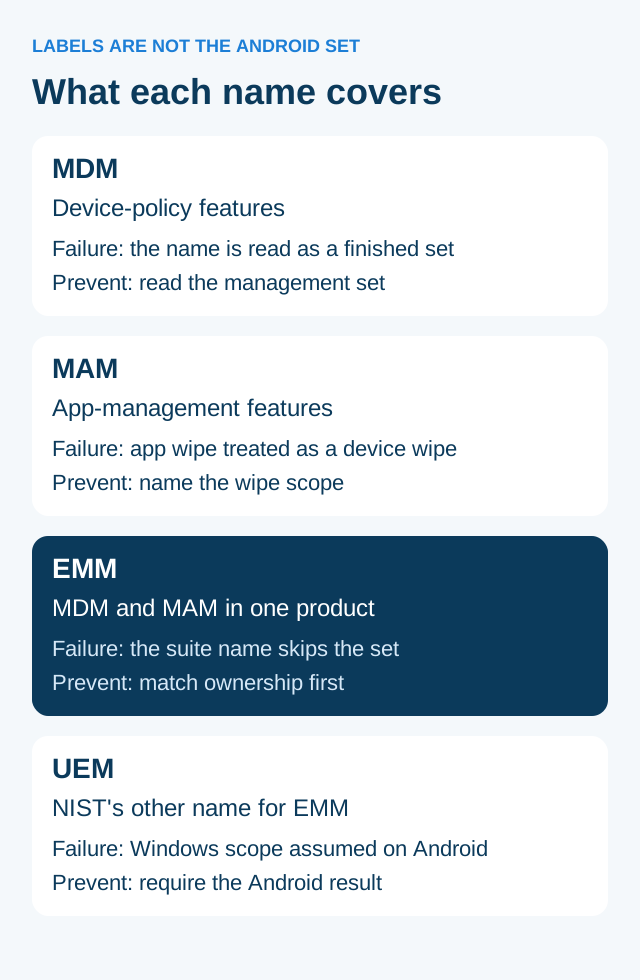
Figure 1. The four labels name a layer of control. They do not choose the Android management set.
Device admin is the old pre-Android 5.0 path. The terminology page says partner support for device admin is no longer provided. A console that still offers only that path is outside the sets below.
The management set decides which part of the phone is in scope
How ownership maps to a work profile, full management, or a dedicated device is the mode guide. Use this page to decide whether the product in front of you is only device policy, only app control, or the combination, and whether that combination can provision the set you need.
The overview lists four deployments: a work profile on an employee-owned device, a work profile on a company-owned device that still allows personal use, a fully managed work-only device, and a dedicated device. A dedicated device is a subset of fully managed devices. Terminology marks corporate-owned, personally enabled (COPE) and corporate-owned, single use (COSU) as deprecated names. The current names are the company-owned work profile and the dedicated device. “Fully managed device with a work profile” was deprecated in Android 11 and replaced by the company-owned work profile.
Scroll horizontally to see all columns.
| Situation | Provision this | Dominant failure mode | Prevention |
|---|---|---|---|
| Employee’s own phone | Personally owned work profile. Android 5.1 or later. PERSONAL_USAGE_ALLOWED |
Full management on a personal phone, or a claim that the organization can see the personal profile | The overview says the organization has no visibility into the personal profile |
| Company phone, personal use stays | Company-owned work profile. Android 8 or later on the provisioning guide. PERSONAL_USAGE_ALLOWED |
devices.delete or a device command is expected to touch only the work profile |
Treat delete and device commands as whole-device actions. Use blockScope when the compliance action itself should be limited |
| Company phone, work only | Full management. Provisioning guide: Android 5.1 or later. Overview: Android 5.0 or later. PERSONAL_USAGE_DISALLOWED |
Personal apps left on a device the organization manages in full | The user signs in with a work email |
| Handset locked to one job | Dedicated device. Token PERSONAL_USAGE_DISALLOWED_USERLESS |
Sign-in URL enrollment, or a token that still requires a work email | The provisioning guide says the sign-in URL is not suitable for dedicated devices. Plan Android kiosk mode for a locked task handset before comparing consoles |
On a personally owned work profile, the overview says the organization has full management control of the apps, data, and settings inside the work profile. The same page says the organization has no visibility or access to the personal profile. On a company-owned work profile the personal profile stays invisible, and the organization can still set device-wide policies. The overview’s examples are Wi-Fi configuration and blocking USB file transfer, plus restrictions on the personal profile such as disallowing certain apps.
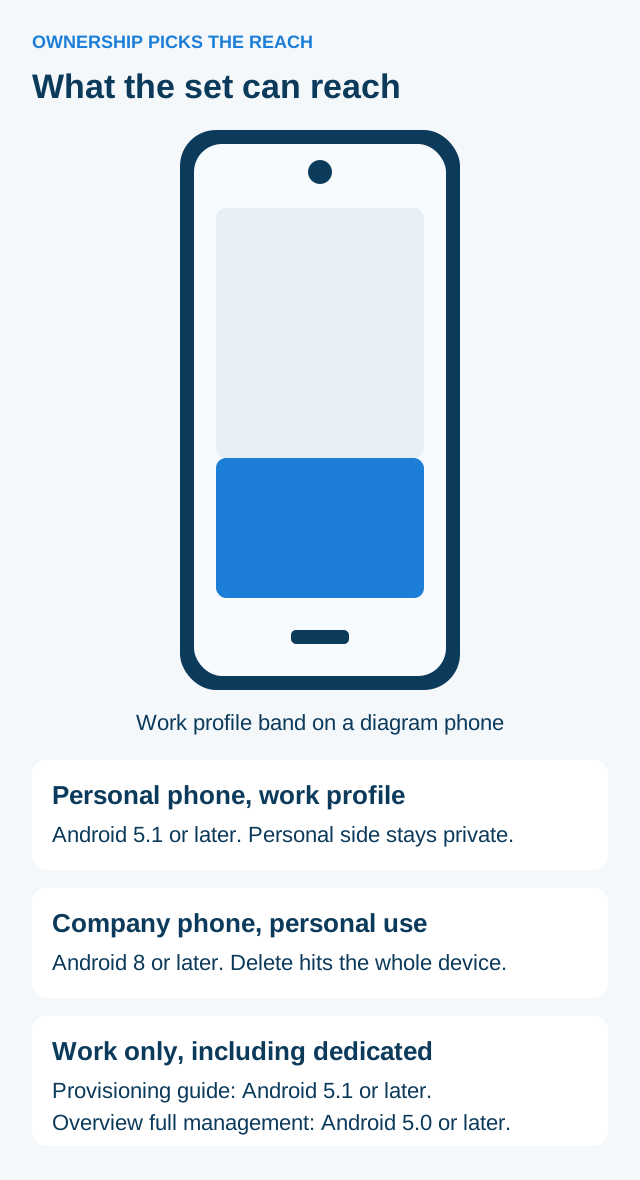
Figure 2. The blue band is the work profile on a diagram handset. Company-owned work profiles still expose the whole device to delete and device commands.
Rule of thumb. If the phone is personally owned, provision the work profile with allowPersonalUsage set to PERSONAL_USAGE_ALLOWED. Full management is the work-only path for a company-owned device.
Rule of thumb. If the company owns the phone and personal use stays, the Android Management API path in the provisioning guide is Android 8 or later. devices.delete still applies to the entire device, so a lost-phone wipe is a whole-handset action even though the personal profile is not visible.
Android 6.0 or later, on the overview, adds granular control of the lock screen, status bar, keyboard, and other key features on dedicated devices, to prevent users from enabling other apps or performing other actions. That version is the control floor for those lock-down features. It is a separate sentence from the 5.1 floor on the work-only provisioning section.
The feature list, updated 2026-07-10 UTC, names the same four solution sets: work profile on a personally owned device, work profile on a company-owned device, fully managed device, and dedicated device. Standard features are marked on that list. An EMM that will manage more than 500 devices must support all the standard features of at least one solution set before that solution can be made commercially available. Listing in Android’s Enterprise Solutions Directory as a Standard Management Set also requires standard-feature verification and membership in the Android Enterprise Partner Program. Advanced features are a further set. The page does not print a price for either set, and it does not print a customer license minimum.
App protection can leave the rest of the phone alone
Intune’s app protection overview, updated 2026-04-14, says these policies protect organization data without requiring device enrollment. The same page says you can use them independent of any MDM solution. On Android, the Company Portal app is required on the device before it can receive those policies. Enrollment can be absent and Company Portal can still be required. Both sentences are on that page.
NIST section 4.2.2 draws the same line in general terms. MAM does not require the device owner to enroll the device, and it does not require the owner to accept an enterprise profile. Intune’s Android requirement is narrower than that general line: Company Portal has to be installed for the app protection policy to arrive.
Intune, on the 2026-05-21 page, describes the MAM wipe as selective. Organization data inside the managed apps can be removed while personal content stays. The MDM wipe on that page is a whole-device wipe after enrollment. Those are different actions. Put the action name on the test sheet before anyone runs it on a phone that holds employee data.
The app protection page organizes its data-protection framework into three levels. It does not print a PIN length or a minimum Android version number for those levels. The cells stay blank.
Scroll horizontally to see all columns.
| Level on the 2026-04-14 page | What that page prints | Dominant failure mode | Prevention |
|---|---|---|---|
| Level 1, enterprise basic | PIN, encryption, selective wipe, and Android device attestation | The level is treated as device enrollment | Confirm Company Portal is installed and the device state is unenrolled if that was the plan |
| Level 2, enterprise enhanced | Data-leakage prevention and minimum OS requirements | An OS floor is invented because this page left the number off | Leave the OS number blank until you open the framework page that prints it |
| Level 3, enterprise high | Advanced PIN configuration and app-protection Mobile Threat Defense | A threat-defense toggle is counted as a device-owner policy | Keep it on the app-protection row |
The app protection page says an app can be managed this way when it integrates the Intune SDK or is wrapped with the Intune App Wrapping Tool. The page points to a public list of protected apps and names Microsoft 365 apps as examples it manages. It also says other apps that connect to on-premises Exchange or SharePoint, aside from the Outlook case it describes, do not support app protection policies.
Google’s path for approved work apps is different. On a device managed through Android Enterprise, managed Google Play is the store, and users install the apps the organization approves. The feature list requires the EMM console to install, update, and uninstall work apps through the Android Management API. That is app management inside device provisioning. It is the MAM half of Google’s EMM definition, and it assumes the management set is already in place.
A team that only needs supported work apps on an employee-owned phone can evaluate app protection without enrollment, with Company Portal present on Android. A task handset that must be locked to one app still needs the dedicated-device token. App protection does not set PERSONAL_USAGE_DISALLOWED_USERLESS.
Five minutes, one hour, and 270 days are already printed
The provisioning guide prints three clocks. Each one ends in another enrollment if you miss it.
A device enrolled without a valid policy is placed in quarantine. Quarantined devices are blocked from all device functions until a policy is linked. If the device is not linked to a policy within five minutes, enrollment fails and the device is factory reset. The guide also says you can attach the policy by putting policyName on the enrollment token, or by relying on a policy named enterprises/<enterprise_id>/policies/default when the token omits a name. A third path is an enrollment notification followed by enterprises.devices.patch. The five-minute factory reset is what happens when none of those links land in time.
Enrollment tokens expire after one hour by default. You can set a custom duration. The guide says that custom value can run up to approximately 10,000 years. Figure 1 on the same page creates a token that enrolls and applies a policy, and it states that after 1800 seconds (30 minutes) the token expires. The same token can be used for multiple devices. A handset that starts setup after the token’s window needs a new token.
If a device remains offline for 270 consecutive days, it has to be reprovisioned. A spare that sits that long is back at the start of setup.
Worked example. The guide prints 1800 seconds and, in the same sentence, 30 minutes. The check is arithmetic on those two printed figures:
token_minutes = 1800 / 60 = 30
The quotient matches the page’s parenthetical. The five-minute reset is also printed as five minutes. Converting that window is arithmetic as well:
reset_seconds = 5 * 60 = 300
Three hundred seconds is the conversion. The page itself says five minutes. The default token lifetime is printed as one hour, which is a separate clock from Figure 1’s 1800 seconds. NIST section 4.2.1.2 gives 45 seconds and 5 minutes as examples of an idle-lock interval an EMM can set. Those examples are not the Android quarantine timer. Keep them on the lock-screen row.
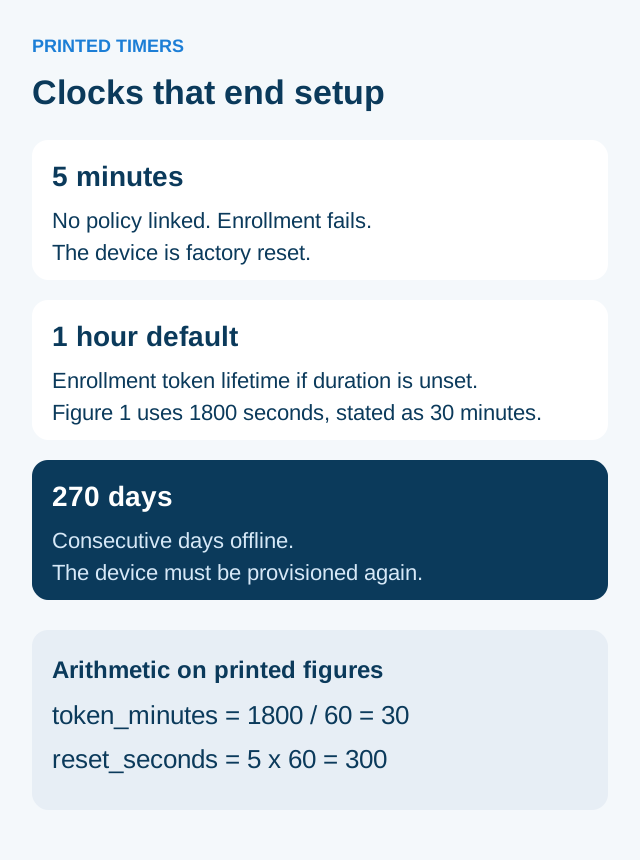
Figure 3. The three clocks are copied from the provisioning guide updated 2026-08-04 UTC. The two equations are arithmetic on those printed numbers.
Rule of thumb. If a device stays unlinked for 5 minutes, enrollment fails and the device is factory reset. Attach policyName, or the enterprise default policy, before that window closes.
Rule of thumb. If consecutive offline time exceeds 270 days, the Android Management API requires reprovisioning. Date the spare from its last check-in.
The rework those clocks create is time on the bench, a factory reset, and a new token. The saved pages do not print a labor rate, a price, or a customer license minimum, so this page leaves those cells blank. What they do print is the blast radius of the wrong command. On a company-owned work profile, devices.delete and device commands apply to the entire device. The personal profile on that handset is part of the device even though the organization cannot see it. The follow-up is another provision. blockScope is the control that chooses whether a compliance action hits the whole device or only the work profile. Delete is documented separately, as a whole-device action.
NIST’s idle-lock examples show a second kind of hidden setting. An EMM can lock the device after idle time, and the publication’s examples are 45 seconds and 5 minutes. It can also wipe after incorrect authentication attempts or after a stretch with no check-in. The publication does not print the Android number of attempts. Leave that cell blank and read it from the policy you actually assign.
A project that calls the Android Management API also has a device quota. The provisioning guide says a quota system controls how many devices each project can manage, and that you must request the initial device quota before the first device. The page does not print the quota figure.
Record the phone, the cable, the dock, and any headset on the Android device compatibility checklist. Enrollment does not answer whether a scanner or a display works with that handset. NFC provisioning, when you use it, has one printed memory floor on the feature list: EMMs must use NFC Forum Type 2 tags with at least 888 bytes. The same item says registration details passed on the tag must exclude passwords and certificates. That 888-byte floor is a tag requirement. It is not a license minimum.
Accept a console from the handset result
Write one row per requirement before the demonstration. The row needs the management set, the allowPersonalUsage value, the Android version floor and the page that printed it, the wipe scope, and what the handset showed.
Scroll horizontally to see all columns.
| Check | Pass looks like this | Leave blank when the page is silent |
|---|---|---|
| Set | The token matches the ownership row above | |
| Stack | Android Device Policy is on the device and managed Google Play offers only approved apps | |
| App protection without enrollment | Company Portal is installed on Android, and the test app is one the Intune page covers | PIN length, OS minimum, price |
| One MDM on the APIs | You are testing a single management product against NIST’s one-MDM platform limit | A second product’s Android scope |
| Five-minute link | A policy is attached inside the printed window, or you have recorded the factory reset | |
| Token | The token is still inside the one-hour default or the duration you set |
|
| Offline spare | The last check-in is inside 270 days, or the spare is marked for reprovision | |
| Price | Until a written proposal prints it | |
| Customer license minimum | These pages do not print one |
A policy row in the console and the same policy on the handset are two observations. Record both. An audit line that says the action was requested still needs the device result beside it. For an offline phone, the pending action stays open until the phone checks in, unless the 270-day clock has already forced a new provision.
Run destructive actions on a designated test unit with disposable data. On a company-owned work profile, say in the employee notice that delete and device commands apply to the entire handset. On a personally owned work profile, the notice can cite the overview’s privacy line: the organization has no visibility or access to the personal profile. A five-minute miss factory-resets the handset and sends that unit back through provisioning.
MDM, EMM, and UEM are the search words. The acceptance line is the set, the token, the wipe scope, and the handset result. Record those four before you keep the console.
Sources and verification
Checked 18 October 2026. Figures below are limited to the saved page. Arithmetic lines in the body are marked as arithmetic.
- Android Enterprise terminology, updated 2026-09-17 UTC. MDM, MAM, and EMM definitions. Deprecated COPE, COSU, and fully managed device with a work profile. Device admin partner support ended.
- Android Enterprise overview, updated 2025-08-28 UTC. Four deployments, the three solution components, personal-profile privacy, company-owned device-wide examples, dedicated devices on Android 6.0 or later, and over 80 policies.
- Enroll and provision a device, updated 2026-08-04 UTC. Version floors, token values, whole-device delete, five-minute quarantine reset, one-hour default token, 1800-second figure, 270-day offline reprovision, and the unnumbered project quota.
- Android Enterprise feature list, updated 2026-07-10 UTC. More than 500 devices, four solution sets, work-app install and removal, and NFC Forum Type 2 tags of at least 888 bytes.
- NIST SP 800-124 Rev. 2, May 2023. EMM, the UEM alias, the one-MDM platform limit, MAM without enrollment, and the 45-second and 5-minute idle-lock examples. CSRC record: final 17 May 2023, supersedes Rev. 1 of 21 June 2013.
- What is Microsoft Intune, updated 2026-05-21. MDM enrollment and whole-device wipe, MAM selective wipe, and the platform list.
- App protection policies overview, updated 2026-04-14. Protection without device enrollment, Company Portal required on Android, and levels 1 to 3 without a printed PIN length or OS number.
Related articles
Android Enterprise Explained: Work Profiles, Full Management and Dedicated Devices
Choose an Android Enterprise management model by ownership and work needs. Understand work profiles, company-owned options, policy scope and pilot acceptance.
Read article
Android Kiosk Mode: What It Is and What to Plan Before Deployment
Plan Android kiosk mode as lock task or one KIOSK app on a company-owned dedicated device, and separate that plan from screen pinning before enrollment.
Read article
Wireless Android Auto Adapter: 5 GHz Wi-Fi and Boot Speed
Separate adapter cold boot from ignition power and phone reconnection, and learn why Android Auto's 5 GHz Wi-Fi requirement promises no startup time.
Read article