
A Five-Minute Android Accessory Compatibility Check
Match a charger, cable, case, or dock to one Android phone by the published model code, USB protocol, voltage pair, and wireless line.
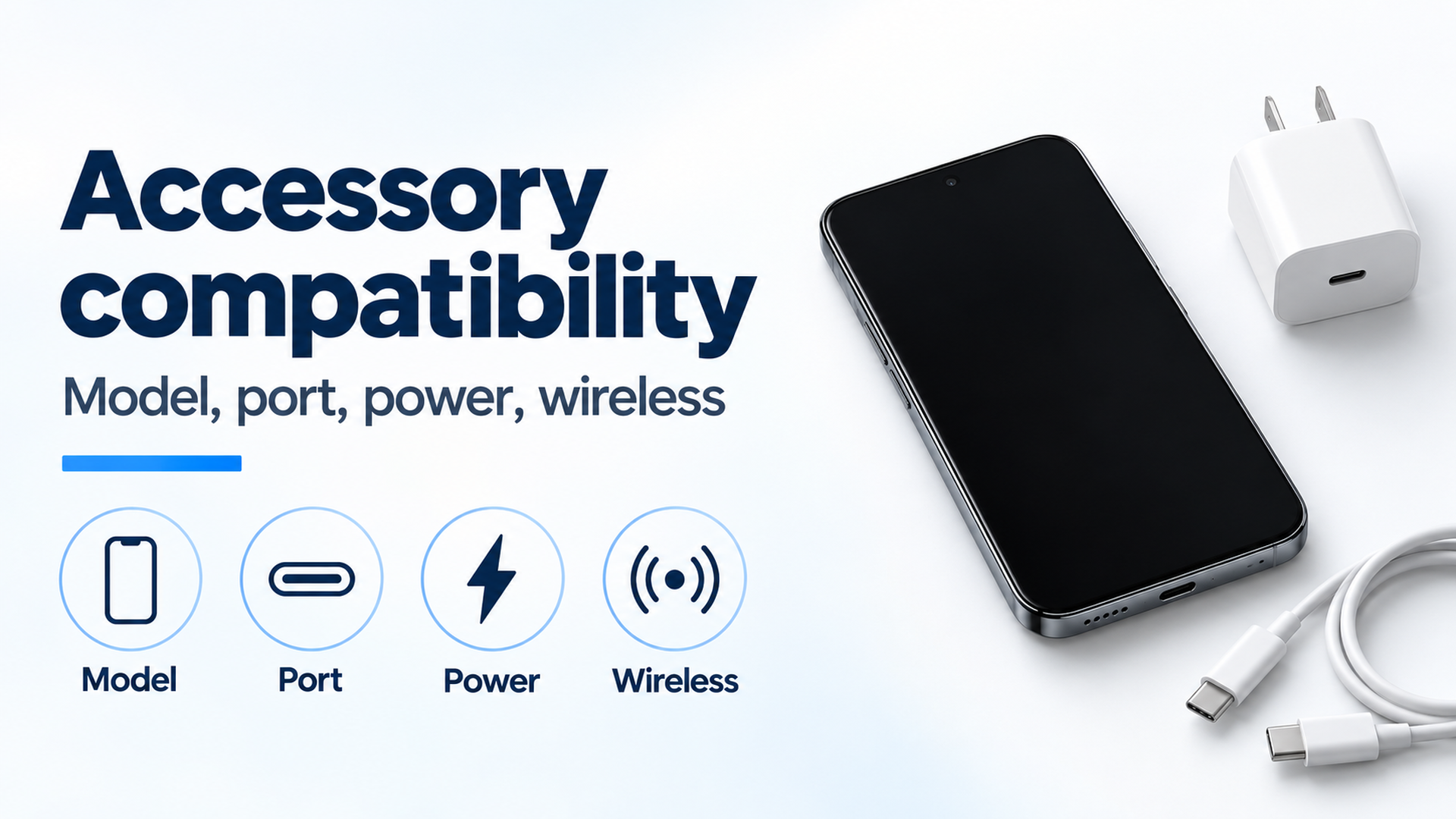
Four fields to copy before buying: model, port, power pair, and wireless line. The phone and charger are an example, not a tested setup.
A charger, cable, or dock bought for the wrong model wastes the purchase. Record the model code on that phone’s hardware page, then match the connector, the power pair, and the wireless line before you buy.
The five-minute check copies four fields from the page that names your phone: the model code, whether that USB Type-C product includes USB Power Delivery, the voltage and current pair rather than the charger nameplate, and the wireless line, which is published separately from the wired rate. On the Pixel hardware specs fetched 17 October 2026, the Pixel 8 section prints model G9BQD and splits Wi-Fi and GNSS by region. The charge page fetched the same day limits wireless charging to Pixel 3 and later with named exceptions, and it says Pixel 10 and later phones will not charge on a Pixel Stand 1st gen or 2nd gen. USB-IF’s packaging guidelines, file date 20 March 2023, treat USB Type-C and USB Power Delivery as separate terms. A manufacturer can ship USB Type-C without Power Delivery, USB4, or USB 3.2.
Figure 1. The four fields to copy before comparing accessory listings. The phone and charger on the right are an example. They are not a certification photo.
Scroll horizontally to see all columns.
| Input or item | Value on the fetched page | Why it matters |
|---|---|---|
| Pixel 8 model code | G9BQD, in the Pixel 8 tech specs | The code to copy. The family name is not this field |
| Pixel 8 radios by region | US (PR), CA, UK, EU, AU: Wi-Fi 7. JP: Wi-Fi 6E. TW, SG, IN: Wi-Fi 6. GNSS lists differ for US, IN, and the rest of the world | One marketing name, different radio lines on the same page |
| USB Type-C and Power Delivery | USB-IF, 20 March 2023: separate terms. Power Delivery can be absent. When present, the charger page describes power up to 240 W | A USB-C plug does not establish the protocol or the watt ceiling |
| Google 30 W USB-C charger, PD pairs | 5.0 V at 3.0 A is 15.0 W; 9.0 V at 3.0 A is 27.0 W; 15.0 V at 2.0 A is 30.0 W; 20.0 V at 1.5 A is 30.0 W | One name, four published powers |
| Pixel 9 family, wired | Up to 27 W on Pixel 9, up to 27 W on Pixel 9 Pro, up to 37 W on Pixel 9 Pro XL, on the Google 45 W USB-C charger in a wall outlet | Three phones in one family, three wired lines |
| Pixel 9 family, wireless | Up to 15 W, 21 W, and 23 W on Pixel Stand (2nd gen). Up to 12 W with Qi-certified EPP chargers | The wireless line is not the wired line |
| Pixel 7 and Pixel 7 Pro | Wired up to 20 W and 23 W on the Google 30 W USB-C charger. Wireless up to 20 W and 23 W on Pixel Stand (2nd gen) | Equal numbers still name different equipment |
| Pixel 10 stands and Qi2 | Pixel 10 and later will not charge wirelessly on Pixel Stand 1st gen or 2nd gen. Qi2 support is Pixel 10 and later, excluding Pixel 10a | A stand that suited an older Pixel is a new check |
| Wired display | “Project your Pixel phone’s screen” labels the cable steps for Pixel 8 and later, with a display that supports DisplayPort or HDMI to USB-C | Cast on that page is a different section from the cable steps |
This page sits in the Android compatibility collection. The numbers below stay with the page that printed them. Another phone brand needs that maker’s model line, not a Pixel sentence.
Copy the model code, not the family name
The Pixel 8 tech specs, fetched 17 October 2026, print model G9BQD. The same section brackets connectivity by region. US (PR), CA, UK, EU, and AU are listed with Wi-Fi 7 (802.11be), 2.4 GHz + 5 GHz + 6 GHz, 2x2+2x2 MIMO. JP is listed with Wi-Fi 6E (802.11ax), 2.4 GHz + 5 GHz + 6 GHz, 2x2+2x2 MIMO. TW, SG, and IN are listed with Wi-Fi 6 (802.11ax), 2.4 GHz + 5 GHz, HE160, and MIMO. Location lines are Dual Band GNSS. US lists GPS, GLONASS, Galileo, and QZSS. IN lists GPS, GLONASS, Galileo, QZSS, BeiDou, and NavIC. The rest of the world lists GPS, GLONASS, Galileo, QZSS, and BeiDou.
The Pixel 7 tech specs on that page print a different code, GVU6C. A listing that says “Pixel” or “Android” has not supplied either code. Write down the marketing name, the model code, and the region bracket that matches the phone in your hand. If the accessory cares about Wi-Fi generation or a satellite system, use the bracket, not the shared name.
Pixel 9, Pixel 9 Pro, and Pixel 9 Pro XL show why the next word in the name also matters. The hardware footnotes put fast wired charging at up to 27 W, up to 27 W, and up to 37 W, in that order, based on the Google 45 W USB-C charger plugged into a wall outlet. Google prints “Actual results may be slower.” Adapters are sold separately. The speed test started from a battery drained to 1% on pre-production hardware and software in early 2024, with the device powered on and default settings. The charge page, fetched the same day, puts Pixel 9 Pro XL in a different sentence: it can charge up to 30 W or more, in a list with named Pixel 10 and Pixel 11 models. Pixel 9 and Pixel 9 Pro are not in that list. Keep both sentences, and keep the charger each sentence names. Do not average 37 W and 30 W into a third figure.
A USB-C plug is not a protocol
USB-IF’s language and packaging guidelines, file date 20 March 2023, say USB Type-C is a connector. They also say USB Type-C and USB Power Delivery are separate terms, and USB Type-C and USB 3.2 or USB4 are separate terms. Manufacturers can support Power Delivery, USB4, and USB 3.2 on a USB Type-C product. Those protocols are not required for the connector. The USB-C cable guide separates charge, data, and video once the same plug leaves this check.
A USB 2.0 Type-C to USB 2.0 Type-C cable, in those guidelines, supports USB 2.0 data and can support USB Power Delivery. It does not include USB 3.2, USB4, or Alt Mode. The TX/RX and Alt Mode (SBU) signals are not implemented on a USB 2.0 Type-C cable. USB-IF also says a USB 3.2 or USB4 host or device used with a USB 2.0 product, or with a USB 2.0 Type-C cable, performs at USB 2.0 speed. A hub listing that only says “USB-C” has not told you which of those cables is in the box.
Figure 2. Example of the three objects in a wired check: phone, cable, and charger. No protocol or current is shown.
Android’s USB host and accessory overview describes two modes. In host mode the phone acts as the USB host and powers the bus. Examples on that page include cameras, keyboards, mice, and game controllers. In accessory mode the external hardware acts as the host and powers the bus. Examples include docking stations, card readers, and diagnostic equipment. Support for both modes depends on the device hardware, regardless of platform level. A keyboard that enumerates shows host mode on that phone. It does not show DisplayPort Alt Mode. The Android USB OTG guide is the page for peripherals.
VESA’s 22 September 2014 announcement says DisplayPort Alt Mode uses the Alternate Mode extension of USB Type-C and repurposes some or all of the four SuperSpeed lanes for DisplayPort audio and video. It also says a video source that supports DisplayPort Alt Mode on USB Type-C can use an adaptor to drive an HDMI, DVI, or VGA display. That is a description of the mode. It is not a statement that a particular phone implements it.
Google’s display steps are on “Project your Pixel phone’s screen,” fetched 17 October 2026. The section “Connect your phone to a display device (Pixel 8 and later)” says to use a display that supports DisplayPort or HDMI to USB-C, plug the DisplayPort or HDMI cable into the display, plug the USB-C cable into the phone, and accept the Mirror display dialog. The same page has a separate Cast section: Settings, Connected devices, Connection preferences, Google Cast. Cast and the Pixel 8 cable steps are different procedures. For a phone outside the Pixel 8 and later heading, use that model’s own display page. The USB-C video output guide walks the dock check from there.
Read the pair, not the nameplate
P = V × I
The Google 30 W USB-C charger safety page, fetched 17 October 2026, prints the output power next to each pair. For USB PD enabled devices the rows are 5.0 V at 3.0 A (15.0 W), 9.0 V at 3.0 A (27.0 W), 15.0 V at 2.0 A (30.0 W), and 20.0 V at 1.5 A (30.0 W). Worked example from that table: 9.0 × 3.0 = 27.0 W, and 5.0 × 3.0 = 15.0 W. Both products match the printed watts. A phone that settles on the 5.0 V pair gets the 15.0 W line from a charger whose name is 30 W.
If the buyer expects 30.0 W from the 5.0 V pair, the current that equation requires is 30.0 / 5.0 = 6.0 A. The published current at 5.0 V is 3.0 A. The pair fails the expectation before any phone limit is applied. PPS on the same page is a separate block, USB PD 3.0 PPS: up to 11.0 V at 3.0 A, 16.0 V at 2.0 A, and 21.0 V at 1.5 A, each printed at 30.0 W. USB PD versus PPS is the terminology page. The full set of phone rates and shared-port limits is the charging wattage guide, in the Android charging collection.
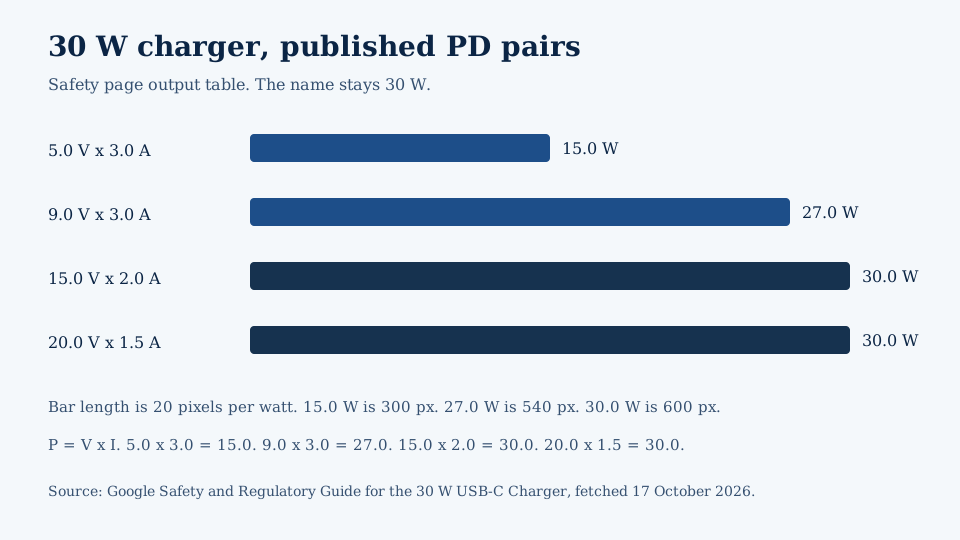
Figure 3. Bar length is 20 pixels per watt, taken from the 30 W charger’s published PD output table. The 5.0 V pair is half the nameplate.
If the published current exceeds 3 A, match a cable rated above 3 A. The same safety page says output currents higher than 3 A are enabled only with a cable rated higher than 3 A, and it gives an e-marker cable rated for 5 A as the example. The four PD currents printed there are 3.0 A, 3.0 A, 2.0 A, and 1.5 A, so those rows do not use the over-3 A condition. Use the rule when the accessory page shows a current above 3 A. The page also says the charger is designed to work best between 32°F and 104°F (0°C and 40°C), and not to use or charge it below 0°C or above 40°C. That range is about this charger.
USB-IF’s charger page, fetched 17 October 2026, says USB PD Revision 3.1, announced in 2021, enables up to 240 W over a full featured USB Type-C cable and connector. Before that update, USB PD was limited to 100 W using 20 V and USB Type-C cables rated at 5 A. The new fixed voltages are 28 V, 36 V, and 48 V, for up to 140 W, 180 W, and 240 W. Those are bus ceilings. Pixel 7 at up to 20 W and Pixel 9 at up to 27 W sit on lower published phone lines. Google’s charge page says a USB-C to USB-C cable is the wired choice, and a USB-A to USB-C cable is for a USB-A adapter and charges more slowly than a USB-C adapter with a USB-C cable. It also says to use a wall outlet rather than a laptop USB-C port when you want the faster charge. The laptop USB-C charger guide covers that second arrangement.
The charge page names adapters for a Pixel: a Google 30 W, 45 W, or 67 W USB-C Fast Charger, any Programmable Power Supply (PPS) adapter rated for 30 W or more, and other USB Power Delivery adapters rated for 15 W or more. It says other cables and adapters might not work with Pixel phones. A “Check charging accessory” notification, on that page, means the cable or USB power adapter may be unsupported or broken. The phone can then charge very slowly or not at all. The fix it gives is a cable and charger the phone’s page already lists.
Treat wireless as its own line
The Wireless Power Consortium’s history of the Qi specifications, fetched 17 October 2026, numbers releases as X.Y.Z. Specifications with the same major revision are backward and forward compatible. Version 1.0 (July 2010) describes a transmitter delivering 5 watt into a Qi receiver. Version 1.2 (October 2015) adds fast charging: a transmitter can deliver up to 15 watt, and a receiver can obtain up to 15 watt. Version 1.1 (March 2012) describes Foreign Object Detection that prevents heating of metal objects near an active transmitter, and the option to power a transmitter from a USB charger. Version 2.0 (April 2023) introduces the Magnetic Power Profile, magnetic attachment and alignment, and states that Qi v2.0 products are not required to be 100% backwards compatible with Qi 1.x certified products. The page lists the current specification as 2.2.1, available to members, and the public download as 2.1. The 15 watt sentence is the 2015 profile ceiling. It is not a phone’s charging rate.
Figure 4. Example of a phone, a wireless pad, and a separate case. Alignment, Qi version, and case support are not visible in the photo.
Google’s charge page splits the wireless instructions. Wireless charging is available on Pixel 3 and later, except Pixel 3a, Pixel 4a, Pixel 4a (5G), Pixel 5a, and Pixel 6a. A later section on the same page says wireless charging is not available on Pixel 3a, Pixel 4a, Pixel 4a (5G), Pixel 5a (5G), and Pixel 6a. Copy the exception wording from the section you used. Pixel 5a and Pixel 5a (5G) are both printed. Do not collapse them.
For Pixel 10 and later, the page says those phones will not charge wirelessly with the Pixel Stand 1st gen or 2nd gen. Qi2 support in the next sentence is Pixel 10 and later, excluding Pixel 10a. Google calls Qi2 a magnetic charging technology and says the magnets align the phone and the accessory. For the fastest wireless speeds it says to use a Qi2-certified charger, and to confirm Qi2 in the Wireless Power Consortium product database by a version number that starts with 2. Older Qi chargers such as Qi1.x still work on that section, at up to 5 W. A case that does not support Qi2 should come off, because the page says it can affect charging.
For Pixel 9a and earlier, the page says to use a Qi 1.x wireless charger or a Pixel Stand that works with the phone. It says MagSafe wireless chargers do not work with Pixel 9a and earlier phones. Keep the pad away from metal or magnets. A thick or metallic case, including magnets or a ring holder, can affect charging or stop it. If charging is slow or unsteady, take the case off. The wireless charging case guide is the next page when the case is the open question.
Hardware footnotes keep wireless watts off the wired line. Pixel 9, Pixel 9 Pro, and Pixel 9 Pro XL are up to 15 W, 21 W, and 23 W on Pixel Stand (2nd gen), and up to 12 W with Qi-certified EPP chargers. Pixel 8 and Pixel 8 Pro are up to 18 W and 23 W on Pixel Stand (2nd gen), and up to 12 W with Qi-certified EPP chargers. Pixel 7 and Pixel 7 Pro are up to 20 W and 23 W on Pixel Stand (2nd gen), which matches their wired numbers and still names the Stand, not the 30 W wall charger. Google prints “Actual results may be slower” on those footnotes.
Worked example on the Pixel 9 footnotes only: 27 W − 15 W = 12 W. The 27 W is the wired line on the Google 45 W charger. The 15 W is the Pixel 9 wireless line on Pixel Stand (2nd gen). Those 12 W are present on the wired footnote and absent from that wireless line. The same footnote’s Qi-certified EPP line is up to 12 W, so 15 W − 12 W = 3 W between the Stand line and the EPP line. Neither subtraction is a wattmeter reading.
Where the check fails
The dominant failure mode is the field the listing skipped. The prevention is copying that field from the phone page before paying.
Scroll horizontally to see all columns.
| Arrangement | What the pages allow | Dominant failure mode | Prevention |
|---|---|---|---|
| Family name only | Pixel 8 is model G9BQD. Pixel 7 is model GVU6C. Pixel 9, 9 Pro, and 9 Pro XL publish different wired watts | The accessory is matched to “Pixel” or “Android” | Copy the model code and the exact phone name |
| USB-C shape as the whole spec | USB-IF: Type-C, Power Delivery, USB 3.2, and USB4 are separate. A USB 2.0 Type-C cable omits Alt Mode | A dock or hub is bought from the plug shape | Read the protocol list and the cable type |
| 30 W nameplate, 5.0 V pair | Printed power is 15.0 W at 5.0 V and 3.0 A | The buyer expects 6.0 A at 5.0 V to reach 30.0 W | Use P = V × I on the printed pair |
| Current above 3 A on a charger page | The 30 W safety page enables current above 3 A only with a cable rated above 3 A | A standard cable is paired with an over-3 A row | Match an e-marker example rated for 5 A when the row exceeds 3 A |
| Wired watts pasted onto a pad | Pixel 9 wired up to 27 W. Wireless on Pixel Stand (2nd gen) up to 15 W | The pad is judged by the wired footnote | Copy the wireless line and the charger it names |
| Pixel Stand on Pixel 10 and later | Those phones will not charge wirelessly on Pixel Stand 1st gen or 2nd gen | An older stand is reused | Replace the stand check. Confirm Qi2 by a database version that starts with 2, except Pixel 10a is outside the Qi2 sentence |
| Case, metal, or magnet on a pad | Qi2 cases must support Qi2. Pixel 9a and earlier: metal, magnets, and ring holders can stop charging. WPC 1.1 Foreign Object Detection is about metal heating near a transmitter | The phone is blamed while the case or a metal object stays in place | Remove the case or the metal object, then retry |
| Keyboard success used as a video test | Android host mode powers the bus for a keyboard. VESA Alt Mode is a source feature. Google’s cable display steps are labeled Pixel 8 and later | A dock is bought because a mouse worked | Use the display section for that model |
| Charger ambient outside 0°C to 40°C | The 30 W charger page says not to use or charge it below 0°C or above 40°C | A slow session is read as the wrong phone | Move the charger into that range, then compare again |
Fill five fields, then keep the pages
Scroll horizontally to see all columns.
| Step | What you write down | Stop when |
|---|---|---|
| 1. Model | Marketing name, model code, region bracket | You only have “Android” or the family name |
| 2. Connector | USB Type-C, and whether the page names Power Delivery, USB 3.2, USB4, or Alt Mode | The listing only says USB-C |
| 3. Power pair | Voltage, current, and printed watts, plus the cable rating if current exceeds 3 A | You copied the largest number on the box |
| 4. Wireless | Supported or not, Qi version, stand model, case note | You reused the wired watt |
| 5. Sources | Phone URL, accessory URL, and the date you opened them | You cannot reopen the sentence you relied on |
The practical loss is a second accessory after the first one misses one of those fields. Google does not print a price for that mistake. The watt gap above is the published difference, 12 W on the Pixel 9 footnotes, between a wired line and a wireless line. A power bank is checked as an adapter: pairs and protocol, not the shape of the plug. This page does not add a power-bank watt rating, because none of the fetched pages states one.
Save the model page and the accessory page with the date. When a later software note or a revised Qi version changes the line, the saved pair shows which sentence you used.
Sources and verification
- Google: Pixel phone hardware tech specs, fetched 17 October 2026. Pixel 8 model G9BQD and regional Wi-Fi and GNSS lines. Pixel 7 model GVU6C. Pixel 7 and Pixel 7 Pro wired rates up to 20 W and 23 W on the Google 30 W USB-C charger, and matching wireless rates on Pixel Stand (2nd gen). Pixel 9 family wired rates up to 27 W, 27 W, and 37 W on the Google 45 W charger. Wireless rates on Pixel Stand (2nd gen) and Qi-certified EPP lines for Pixel 9, Pixel 8, and Pixel 7 families. Test conditions, and the printed line “Actual results may be slower.”
- Google: Charge your Pixel phone, fetched 17 October 2026. USB-C to USB-C versus USB-A to USB-C. PPS adapters at 30 W or more and other PD adapters at 15 W or more. Models at up to 30 W or more. Wireless exceptions. Pixel 10 stands, Qi2, the database version check, Qi1.x at up to 5 W, cases, and the Pixel 9a and earlier MagSafe and Qi 1.x instructions. “Check charging accessory.” Wall outlet versus a laptop USB-C port.
- Google: Project your Pixel phone’s screen, fetched 17 October 2026. Cast path, and wired display steps labeled for Pixel 8 and later.
- Google: Safety and Regulatory Guide for the 30 W USB-C Charger, fetched 17 October 2026. PD voltage, current, and watt rows. PPS rows at 30.0 W. Cable rating above 3 A. 0°C to 40°C use range.
- USB-IF: USB Type-C language and packaging guidelines, file date 20 March 2023, fetched 17 October 2026. USB Type-C, USB Power Delivery, USB 3.2, and USB4 are separate. USB 2.0 Type-C cables omit Alt Mode.
- USB-IF: USB Charger (USB Power Delivery), fetched 17 October 2026. Up to 240 W, the prior 100 W limit at 20 V on 5 A cables, and 28 V, 36 V, and 48 V.
- Android Developers: USB host and accessory overview, fetched 17 October 2026. Host mode and accessory mode, and hardware-dependent support.
- VESA: DisplayPort Alternate Mode on USB Type-C, 22 September 2014, fetched 17 October 2026. Alt Mode repurposes SuperSpeed lanes. An adaptor path assumes the source supports Alt Mode.
- Wireless Power Consortium: History of the Qi specifications, fetched 17 October 2026. Version numbering, 5 watt in version 1.0, up to 15 watt in version 1.2, Foreign Object Detection in version 1.1, Magnetic Power Profile in version 2.0, and the backwards-compatibility sentence for Qi v2.0 and Qi 1.x.
USB Type-C and USB-C are registered trademarks of USB Implementers Forum. Qi is a registered trademark of Wireless Power Consortium Inc. The watt arithmetic uses the published voltage, current, and power rows, plus the stated 30.0 W at 5.0 V assumption and the Pixel 9 footnote subtraction.
Library search on 17 October 2026 returned no usb.org, support.google.com, or wirelesspowerconsortium.com documents. No cached SERP for this query was available, so no competitor page was purchased or used as a fact source.
Related articles
Android USB OTG: What It Is and What to Check Before Buying an Adapter
Confirm the phone can source VBUS, then separate a Micro-AB ID pin, a USB-C plug with Rd, and a PPS charger before you buy an adapter.
Read article
USB-C DisplayPort Alt Mode: Android Phone Support List
Samsung's DeX cable and HDMI series, Google's Pixel 8 and later wired steps, and the VESA lane rates behind a USB-C DisplayPort adapter.
Read article
USB-C Video Output on Android: How to Check Before Buying a Dock
Confirm the phone's documented video path, then separate DisplayPort lanes, a 60W or 240W cable logo, and a PPS charger before you buy a dock.
Read article