
USI Stylus: Android Tablet Compatibility
A USI stylus uses an open two-way active pen standard across certified tablets and Chromebooks, but fails on non-USI phones and Wacom EMR Galaxy tablets.
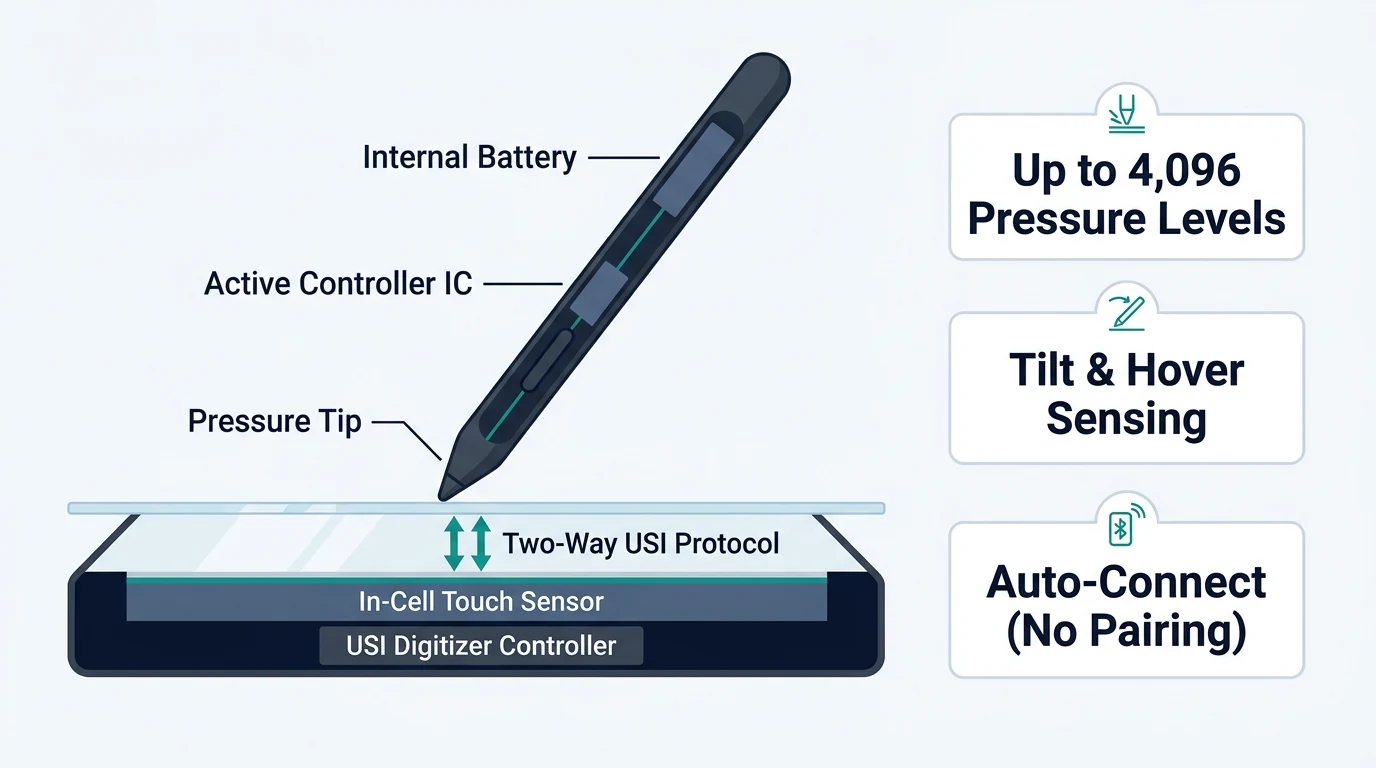
Schematic cutaway (not to scale): a USI active pen pairs internal battery-powered electronics with a screen's USI digitizer controller through a two-way digital link that works without manual pairing.
A USI stylus is an active digital pen built to the Universal Stylus Initiative two-way communication protocol, delivering up to 4,096 pressure levels, tilt detection, and automatic connection without manual pairing. It only writes on Android tablets and Chromebooks whose screens include a USI digitizer—never on ordinary Android phones or Wacom EMR Galaxy tablets.
Before ordering any active pen, verify the display’s touch controller protocol alongside the tablet model code. Our five-minute Android accessory compatibility check covers how to record exact hardware identifiers before buying, while the broader Android compatibility hub organizes port, display, and peripheral checks across devices.
What is a USI stylus and how does two-way communication work?
A USI stylus is a certified active pen governed by the Universal Stylus Initiative, a non-profit industry alliance launched on April 23, 2015 by device makers, stylus manufacturers, and touch-controller vendors. Unlike one-way styluses, USI defines a continuous two-way digital protocol so the pen and touchscreen constantly exchange pressure, tilt, button, and preference data across participating brands.
How two-way USI signaling differs from one-way active pens
In Logitech Education’s technical overview of the standard, the Universal Stylus Initiative is defined as a global industry standard for active styluses and the touch-enabled devices they write on, governing how pens and screens communicate across complementary products. Whereas non-USI styluses rely on one-way communication, USI establishes a bidirectional link between the pen and the display’s digitizer controller.
That two-way channel unlocks several hardware capabilities documented in the Universal Stylus Initiative specification overview:
- Stored ink preferences: Because the host screen and pen communicate in both directions, the stylus can remember user preferences for ink color and stroke style when moving between USI screens.
- 9-axis inertial measurement and multi-pen sessions: The protocol supports 9-axis inertial measurement alongside multiple simultaneous styluses writing on a single touchscreen.
- Continuous listening without alternating power pulses: Self-powered active styluses use an internal battery to transmit signals so the host digitizer can listen continuously rather than alternating between transmit and receive modes, which can reduce stroke jitter.
- Protocol and electrical certification: The USI active stylus certification program launched on June 10, 2020, and Logitech notes that certified devices undergo specific protocol compliance and rigorous electrical testing. Note that although USI promotes itself as an open standard, full detailed specifications remain restricted to paying alliance members.
How Android processes USI pressure, tilt, and palm rejection
On supported Android tablets and ChromeOS devices, the active pen’s electronic signals reach the built-in digitizer and its dedicated controller, enabling hover tracking, pressure sensing, function buttons, and palm rejection. As peer-reviewed handwriting stability research in Sensors notes, dedicated hardware stylus protocols capture fine-grained pressure and tilt measurements that lower temporal-resolution capacitive finger touch cannot match. Android Developers documents how the operating system exposes those signals to drawing and note-taking apps through its motion-event pipeline:
- Normalized pressure scale: The Android Open Source Project touch-device specification normalizes raw digitizer pressure between 0.0 (hovering with no screen contact) and 1.0 (full normal pressure) using a default scale factor equal to 1.0 divided by the hardware’s maximum raw pressure value. Applying 1.0 divided by raw pressure maximum yields a step ratio of 1.0 / 2,048 on USI 1.0 (up to 2,048 levels), 1.0 / 4,096 on USI 2.0 (up to 4,096 levels), and 1.0 / 8,192 on professional pens such as Wacom Pro Pen 2 and Huion PW500/PW507 (8,192 levels)—doubling the raw pressure resolution halves each normalized pressure increment.
- Tilt in radians: Android reports stylus inclination in radians from vertical; Android Developers illustrates a 45-degree tilt from perpendicular at approximately 0.785 radians.
- Palm rejection across Android versions: Android cancels accidental resting-palm touches through its motion-cancellation action (introduced in Android 1.0, API level 1) and an explicit canceled-touch flag added in Android 13 (API level 33).
- Touch sampling rate and front-buffer rendering: Android Developers notes that hardware touchscreen sampling rates span 60 to 1,000 Hz, while Android’s Jetpack low-latency front-buffer rendering library operates on Android 10 (API level 29) and higher as well as ChromeOS running Android 10 and higher.
What changed between USI 1.0 and USI 2.0?
Released on February 28, 2022, USI 2.0 doubled maximum pressure sensitivity from 2,048 to 4,096 levels, expanded the stored color palette from 256 colors to 16 million colors, enhanced tilt handling, and added support for in-cell display panels and NFC wireless charging. Because display stacks changed, some USI 1.0 pens fail to register on USI 2.0 screens.
Scroll horizontally to see all columns.
| Specification attribute | USI 1.0 | USI 2.0 | Buyer impact |
|---|---|---|---|
| Specification release date | September 22, 2016 | February 28, 2022 | Newer Android tablets adopt USI 2.0 rather than 1.0 |
| First ecosystem milestones | 14 product companies announced September 26, 2019; certification launched June 10, 2020 | Google and Amazon USI 2.0 tablets reported June 20, 2023 | Modern consumer Android tablets largely start at USI 2.0 |
| Maximum pressure sensitivity | Up to 2,048 levels | Up to 4,096 levels | Doubles pressure steps across Android’s 0.0 to 1.0 pressure scale |
| Stored ink color palette | 256 colors | 16 million colors | Preserves exact RGB brush colors across USI apps |
| Tilt, buttons, and eraser | Tilt detection, button presses, eraser functionality | Expanded tilt functionality, buttons, and eraser | Smoother angle shading in tilt-aware Android apps |
| Multi-stylus support | Multiple simultaneous styluses on one device | Supported under USI protocol | Enables collaborative annotation on one screen |
| Display panel architecture | Discrete touch-sensor panels | Adds support for in-cell display panels | Allows thinner tablet screens with integrated sensors |
| Wireless charging support | Not included in USI 1.0 feature set | Adds NFC wireless charging capability | Enables cable-free pen charging on NFC-equipped hosts |
| Cross-version compatibility | Works on USI 1.0 screens | Some USI 1.0 pens do not work on certain USI 2.0 screens | Match a USI 2.0 stylus to any USI 2.0 tablet |
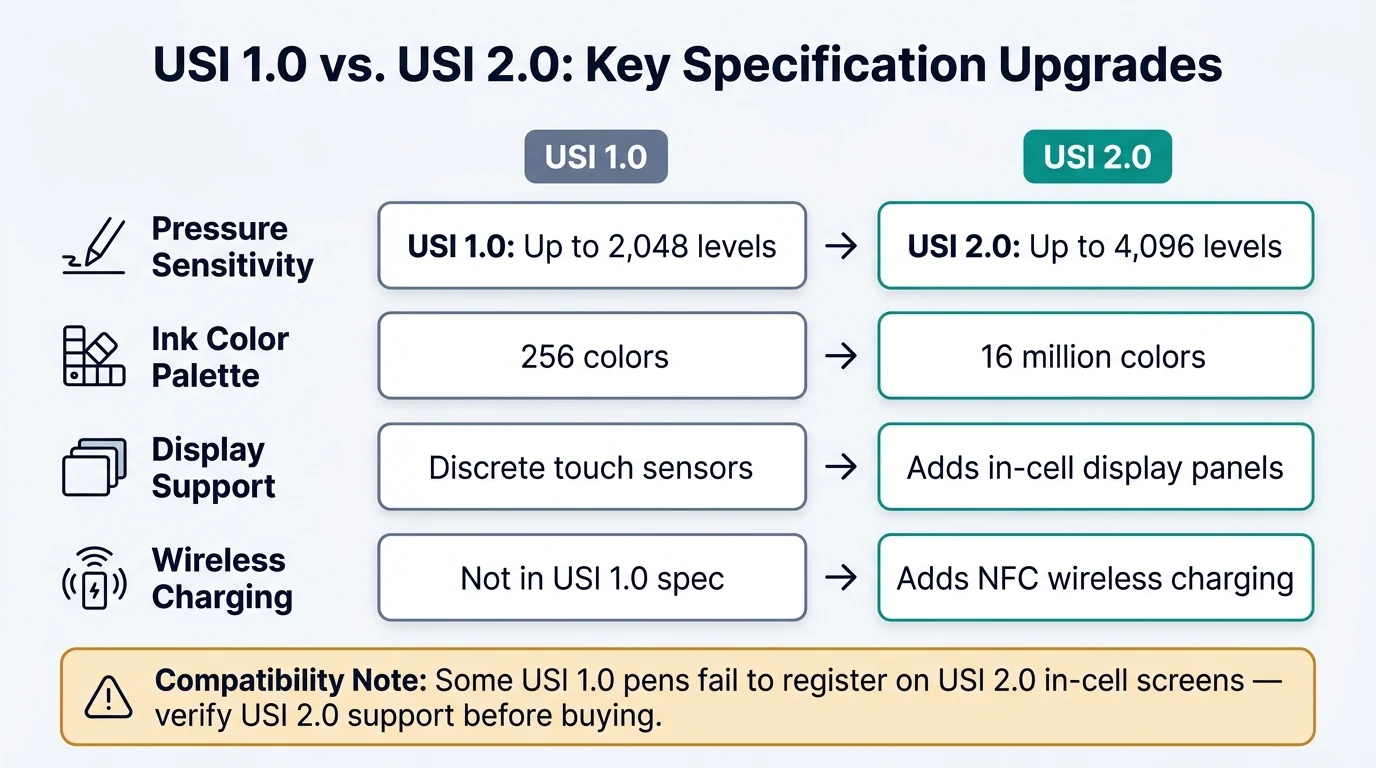
Why some USI 1.0 pens fail on USI 2.0 tablets
Many buyers treat version numbers as automatically backward compatible, assuming an older USI 1.0 pen from a 2020 Chromebook will write on a newer USI 2.0 Android tablet. The Universal Stylus Initiative reference explicitly records backward-compatibility reports in which certain USI 1.0 styluses fail to work with screens certified as USI 2.0 compatible.
The practical takeaway is simple: when your tablet specification sheet lists USI 2.0—particularly on thin tablets built with in-cell display panels—choose a stylus explicitly labeled USI 2.0 rather than relying on legacy USI 1.0 inventory. Conversely, check whether a USI 2.0 stylus listing explicitly confirms USI 1.0 fallback if you plan to share one pen between an older Chromebook and a newer Android tablet.
Which Android tablets and Chromebooks support USI 2.0?
USI 2.0 support spans select Android tablets—notably Google’s Pixel Tablet and Amazon’s USI 2.0 tablet hardware reported in June 2023—alongside Chromebooks from Acer, ASUS, HP, Lenovo, and Samsung. Because major manufacturers ship multiple pen standards across different product lines, you must confirm USI certification for the exact model rather than the brand name.
As of 2022, the Universal Stylus Initiative promoter roster includes Google, Intel, Lenovo, Samsung, and Synaptics, with Dell, Sharp, and Wacom listed as contributors. By 2019, membership had surpassed 30 companies including Google and 3M, while Apple and Microsoft had not joined—explaining why iPads and Surface tablets remain outside the USI ecosystem.
Scroll horizontally to see all columns.
| Device family or ecosystem | Documented stylus protocol | Specific published examples and boundaries | USI stylus compatible? |
|---|---|---|---|
| Google Pixel Tablet | USI 2.0 | Certified by USI in May 2022; 10.95-inch (278 mm) 2560 × 1600 WQXGA LCD at 276 ppi, 16:10 aspect ratio | Yes (verify USI 2.0 pen) |
| Amazon USI 2.0 tablet line | USI 2.0 | Reported alongside Google in June 2023 USI 2.0 tablet announcement | Yes (on USI 2.0-certified models only) |
| USI Chromebooks | USI 1.0 or USI 2.0 | Acer, ASUS, HP, Lenovo, and Samsung have released USI Chromebooks (including Samsung Galaxy Chromebook 2) | Yes (match USI 1.0 vs. 2.0 to model) |
| Samsung Chromebook Plus, Pro, and original Galaxy Chromebook | Wacom EMR (S Pen) | Documented as S Pen models rather than USI | No |
| Samsung Galaxy Tab S series | Wacom EMR (S Pen) | All Tab S models since Tab S3 except Galaxy Tab S5e | No |
| Samsung Galaxy S Ultra and Z Fold phones | Wacom EMR (S Pen) | S21 Ultra onward (bundled since S22 Ultra); Z Fold 3 onward except Z Fold 7 and Z Fold SE | No |
| Apple iPad and Microsoft Surface | Non-USI proprietary standards | Apple and Microsoft had not joined USI by 2019 | No |
Notice the sharpest brand-level trap in that table: Samsung is both a USI promoter and the largest shipper of Wacom EMR tablets. Across Samsung’s own hardware line, the Samsung Galaxy Chromebook 2 uses USI, whereas the Samsung Chromebook Plus, Chromebook Pro, original Galaxy Chromebook, and Galaxy Tab S tablets (since Tab S3, excluding Tab S5e) use Wacom EMR S Pen digitizers. Seeing “Samsung” or “Lenovo” on a tablet box never guarantees USI support by itself.
Can you swap a USI stylus with a Samsung S Pen or passive capacitive pen?
No—you cannot swap a USI stylus with a Samsung S Pen across tablets because USI active electrostatic pens and Wacom EMR pens rely on incompatible digitizer hardware. A passive capacitive stylus works on almost any touchscreen by mimicking a finger, but it forfeits pressure levels, tilt detection, hover tracking, and palm rejection.
Active stylus vs. capacitive stylus hardware differences
Comparing an active stylus vs. capacitive stylus starts with what sits inside the barrel. As peer-reviewed stylus engineering research in Sensors explains, capacitive-type touch system (CTS) passive styli contain no electronic components or battery: they rely on electrostatic conduction through a bulky rubber, conductive foam, or copper tip to distort the screen’s electrostatic field just like a human finger, resulting in higher latency and lower precision.
Because a capacitive touchscreen treats a passive stylus identically to skin, it cannot register pen pressure or tilt angle, and it cannot distinguish the stylus tip from a finger or a resting palm—every contact writes or triggers unwanted taps. By contrast, an active pen integrates a digitizing sensor and internal electronics that generate wireless signals read by a dedicated digitizer controller inside the display. That active signaling enables fine tip tracking, hover detection above the glass, programmable barrel buttons, eraser tips, and hardware-assisted palm rejection.
The critical trade-off is strict protocol lock-in: the digital protocol of an active pen must match the device’s digitizer, or input from the pen will not register on the screen at all.
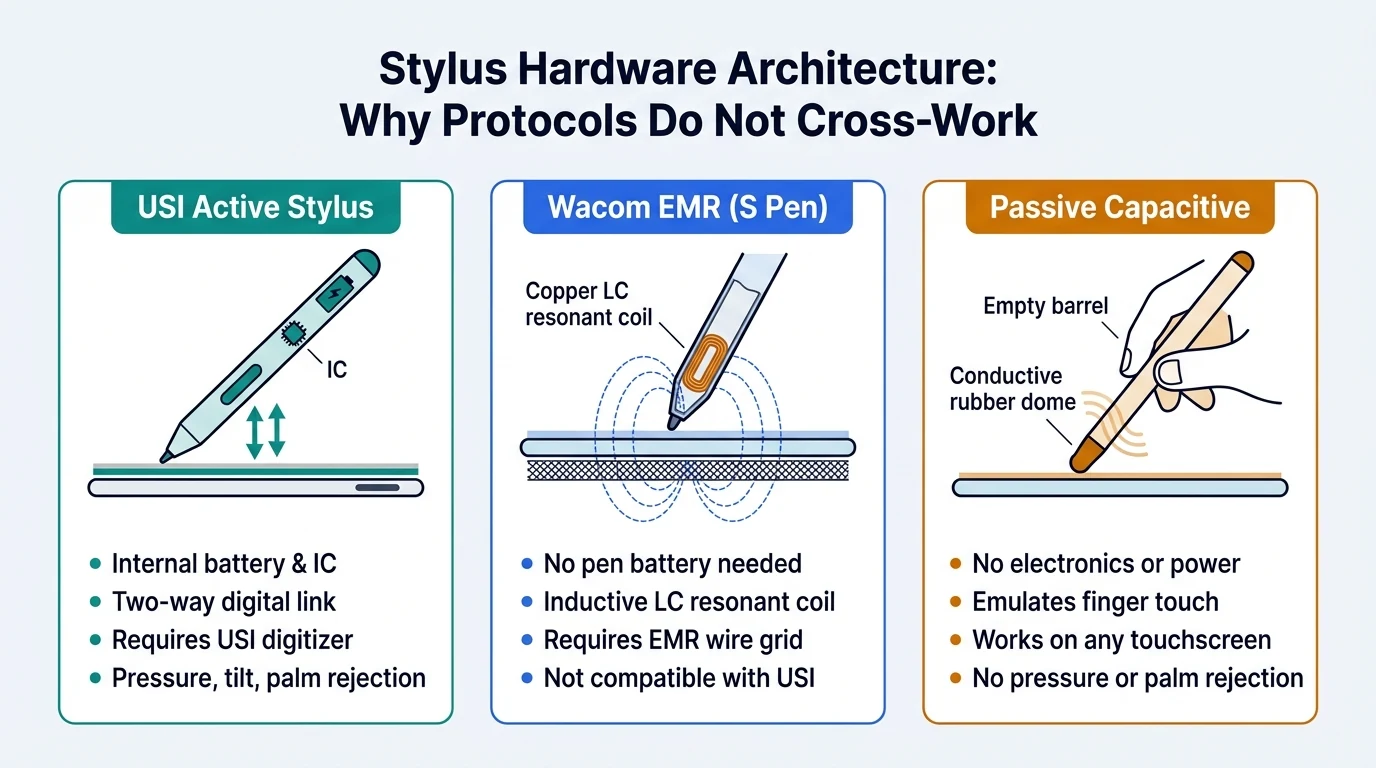
Why Wacom EMR (S Pen) and USI pens cannot cross-work
Samsung’s S Pen and a USI stylus are both active pen ecosystems, yet they operate on completely different physical sensing principles:
- How Wacom EMR powers the S Pen: As documented in Sensors, electromagnetic resonance (EMR) digital pens require no battery power because their inbuilt electronics are charged through the magnetic field of a digitizer integrated in the display. Horizontal and vertical wire grids behind the screen emit faint radio-frequency magnetic waves received by an LC resonant circuit inside the stylus, then switch to receive mode to read the returned signal. Because the screen powers the pen inductively, an EMR stylus needs no battery to write and achieves low-latency hover tracking—reaching 2.8 ms on the Galaxy S22 Ultra compared with 26 ms on the Note 20 and 9 ms on the Note 20 Ultra and S21 Ultra.
- EMR cross-brand compatibility vs. USI isolation: Compatible Galaxy devices work with third-party Wacom EMR pens—including the Wacom One Pen, Staedtler Noris Digital, LAMY AL-star black EMR, and Hi-Uni Digital Mitsubishi Pencil—and use fine nibs such as 0.7 mm (Tab S6 through Tab S9 and S21 Ultra through S24 Ultra) or 1.5 mm (Z Fold 3 through 6, S25 Ultra, and S26 Ultra). Bluetooth on the S Pen (present from Note 9 through S24 Ultra and omitted on the S25 Ultra) handled remote button shortcuts only; actual inking stayed on Wacom EMR.
- Why USI fails on EMR screens (and vice versa): A USI tablet’s capacitive in-cell touch controller lacks the dedicated EMR magnetic induction wire grid, so an S Pen produces zero cursor or ink on a Google Pixel Tablet. Conversely, a Galaxy Tab S digitizer expects inductive EMR resonance rather than USI’s battery-powered two-way capacitive handshake, so a USI stylus stays completely dead on a Galaxy Tab S screen.
Scroll horizontally to see all columns.
| Architecture feature | USI Active Stylus (USI 1.0 / 2.0) | Wacom EMR (Samsung S Pen) | Passive Capacitive Stylus |
|---|---|---|---|
| Physical sensing principle | Battery-powered two-way digital link with USI touch controller | Electromagnetic induction between screen wire grid and pen LC resonant coil | Conductive tip distorts screen’s electrostatic field like a human finger |
| Pen power source | Removable or rechargeable battery (USI 2.0 adds NFC wireless charging) | Battery-free for writing (inductively powered by screen) | No power or electronics required |
| Pressure sensitivity | Up to 2,048 levels (USI 1.0) or 4,096 levels (USI 2.0) | Supported via Wacom EMR (professional EMR pens reach 8,192 levels) | None |
| Tilt, hover, and palm rejection | Yes (hover, tilt, buttons, eraser, palm rejection) | Yes (hover, tilt, side button, palm rejection; 2.8 ms latency on S22 Ultra) | None (screen cannot separate tip from resting palm) |
| Cross-brand pen swapping | Works across certified USI devices (check USI 1.0 vs. 2.0) | Works across Wacom EMR devices (Wacom One, Staedtler Noris Digital, LAMY EMR) | Works on virtually any capacitive smartphone or tablet |
| Works on ordinary Android phones? | No (unless phone includes a USI digitizer) | Only on S Pen models (Galaxy S Ultra since S21 Ultra; Z Fold 3–6) | Yes |
Does a USI stylus work on an ordinary Android phone?
No—a USI stylus will not write on an ordinary Android smartphone because standard phone touchscreens only include a multi-touch capacitive panel without a USI digitizer controller. Although the USI standard technically encompasses phones alongside tablets and computers, an active pen cannot register unless the handset’s display hardware implements USI.
If you buy a “universal” USI active pen for a standard Android handset—or for a stylus-equipped Galaxy S22 Ultra, S23 Ultra, S24 Ultra, or S25 Ultra that runs Wacom EMR instead of USI—touching the tip to the glass produces no response at all. For an ordinary Android phone with no active digitizer, only a passive capacitive stylus can emulate finger taps, with the expected loss of pressure sensitivity and palm rejection.
Use this four-field pre-purchase protocol check before adding any tablet or phone stylus to your cart, and browse our Android accessories collection when pairing pens with cases, docks, or keyboards:
Scroll horizontally to see all columns.
| Check step | What to verify on the manufacturer spec page | Stop and switch pen type if… |
|---|---|---|
| 1. Exact model code | Full device model name and generation (not just brand or series) | You only checked the brand name (for example, Samsung ships both EMR and USI devices) |
| 2. Digitizer protocol | Explicit mention of USI, USI 2.0, Wacom EMR, or S Pen | The spec sheet lists only capacitive multi-touch with no active stylus standard |
| 3. USI version match | Whether the tablet lists USI 1.0 or USI 2.0 (especially with in-cell panels) | You plan to pair an older USI 1.0 stylus with a USI 2.0-certified screen |
| 4. Charging and OS support | Power source (removable or rechargeable battery, or USI 2.0 NFC wireless charging) plus Android 10 or Android 13 app support | You expect NFC wireless charging on a USI 1.0 host or palm cancellation in an app that ignores canceled-touch flags |
How do you wake, pair, or turn on a USI stylus?
You do not pair a USI stylus in Android Bluetooth settings, install drivers, or load a companion app. Once the pen has power from its internal battery or recharge cycle, picking it up and bringing the tip near or onto a USI-certified screen automatically initiates two-way wireless registration and sync.
Logitech Education highlights this zero-setup workflow as a core advantage of the USI standard: users simply pick up a certified pen—such as a 4,096-level Logitech Pen—and start writing immediately on any USI touchscreen without manual pairing. Android Developers likewise identifies that initial wireless registration and sync between stylus and operating system as an automatic hardware handshake handled by the touch controller when the pen comes into range.
If a USI stylus fails to wake or leave ink on an Android tablet, check these four causes in order before requesting a replacement:
- Verify pen power first: Because USI is a self-powered active pen protocol rather than battery-free EMR, a drained battery or uncharged internal cell prevents the pen’s controller IC from transmitting. Charge the pen via its cable or NFC wireless charging surface (on USI 2.0 models) or replace its removable battery.
- Confirm the screen actually supports USI: Re-check the tablet’s official hardware specifications to verify USI certification—do not confuse a Wacom EMR tablet (such as a Galaxy Tab S) or a standard capacitive screen with a USI display.
- Rule out a USI 1.0 pen on a USI 2.0 screen: If you are reusing an older USI 1.0 stylus on a newer USI 2.0 tablet, test a certified USI 2.0 pen to rule out the documented cross-version incompatibility on certain USI 2.0 screens.
- Test in a second note-taking app: If cursor hover or basic taps work on the Android home screen but pressure, tilt, or palm rejection misbehaves inside one app, that application may not read Android’s pressure, tilt, or canceled-touch flags cleanly.
Frequently asked questions
Does “Universal” in USI mean the stylus works on every Android device?
No. Universal in Universal Stylus Initiative means one certified USI pen works across USI-certified screens from multiple brands—such as Google, Lenovo, Acer, ASUS, HP, and Samsung USI models—without brand lock-in. The screen itself must still contain a USI-compatible digitizer.
Can a USI 2.0 stylus work on a Samsung Galaxy Tab S9 or Galaxy S24 Ultra?
No. Samsung Galaxy Tab S tablets (all models since Tab S3 except Tab S5e) and Galaxy S Ultra phones (S21 Ultra onward) use Wacom EMR digitizers built for the S Pen and third-party EMR pens, not the USI protocol.
Are USI 1.0 pens backward compatible with USI 2.0 tablets?
Not always. While USI targets cross-brand interoperability, published reports document cases where USI 1.0 styluses fail to register on certain USI 2.0-certified screens, making a USI 2.0 pen the safer match for USI 2.0 tablets such as the Google Pixel Tablet.
Do USI styluses need Bluetooth turned on to write?
No. USI pens communicate directly with the screen’s touch controller over the two-way USI protocol rather than requiring manual Bluetooth pairing or driver installation.
What is the main difference between an active stylus and a passive capacitive stylus?
An active stylus (such as USI or Wacom EMR) contains electronics that communicate with a matching screen digitizer to provide pressure sensitivity, tilt, hover tracking, and palm rejection. A passive capacitive stylus contains no electronics, works on any capacitive touchscreen by mimicking a finger, and cannot report pressure, tilt, or palm rejection.
Sources
- Sensors — The Hybrid Stylus: A Multi-Surface Active Stylus for Interacting with and Handwriting on Paper, Tabletop Display or Both
- Sensors — The Research on the Handwriting Stability in Different Devices and Conditions
- Wikipedia — Universal Stylus Initiative
- Android Developers — Advanced stylus features
- Android Open Source Project — Touch Devices
- Logitech Education — What Is USI and How It Can Help Educators
Related articles

Android eSIM Transfer: Carrier & EID Checks
Verify carrier transfer paths, target handset EID and IMEI numbers, and profile deletion order before moving an eSIM between Android or iOS devices.
Read article
USB-C DisplayPort Alt Mode: Android Phones
Check which Samsung Galaxy phones, Android tablets, and Pixel models support USB-C DisplayPort Alt Mode, full-featured cables, active HDMI, and DisplayLink.
Read article
Android eSIM: How to Check Phone and Carrier Support
Check the exact Android phone, the carrier activation path, and which lines can stay enabled before you buy or transfer an eSIM.
Read article