
USB PD vs. PPS: The Android Charging Difference That Matters
PPS is optional inside USB PD 3.0. The phone requests a voltage in 20 mV steps. A 60W or 240W mark is a cable logo.
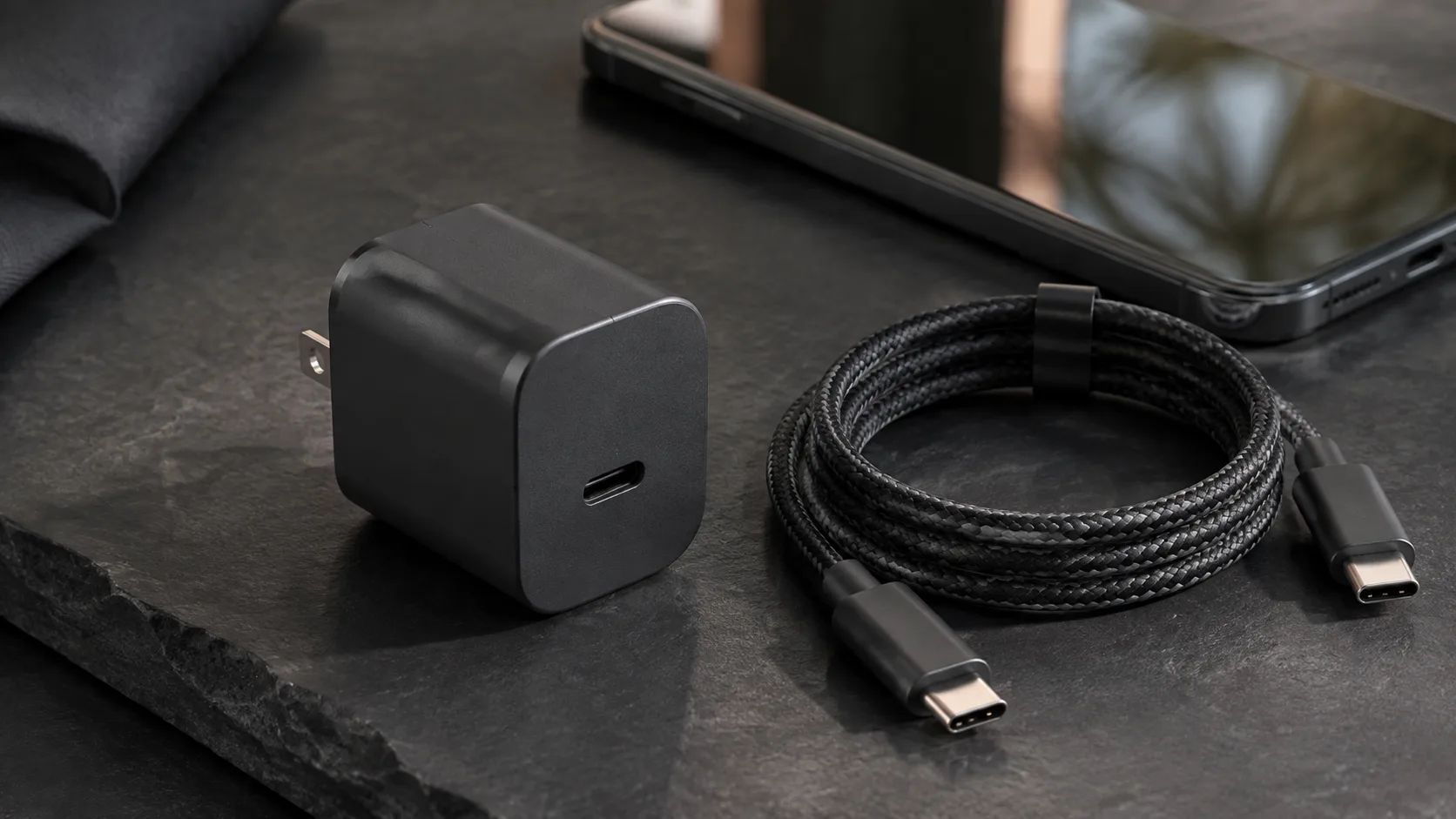
A phone, a USB-C charger, and a cable on a desk. The photograph does not show a PPS range, a cable power logo, or a measured charge.
Choosing the larger watt number on the charger box fails the Android fast-charge path when that box lists only fixed USB PD voltages and the phone’s mode needs PPS.
PPS is the optional Programmable Power Supply feature of USB Power Delivery 3.0. In a PPS contract the sink requests a voltage inside the charger’s advertised range, in 20 mV units, and an operating current in 50 mA units.
USB Power Delivery is the contract. The charger advertises power options, the phone requests one, and the charger accepts. PPS is optional inside USB PD 3.0, so a charger can print USB PD and still leave PPS off the sheet. USB-IF’s fast-charger note puts that feature on hosts, devices, and chargers. A cable does not add it, and the USB4 page does not define it. Google’s Pixel won’t-charge page names a PPS adapter rated 30 W or more, and other PD adapters rated 15 W or more, with speeds that vary by Pixel phone. Samsung’s Singapore support page says Super Fast Charging needs USB PD PPS when the maximum output is high. The 60W and 240W marks are USB-C cable logos. They are not a charger rating and not a power-bank rating. Start from the Android charging section.
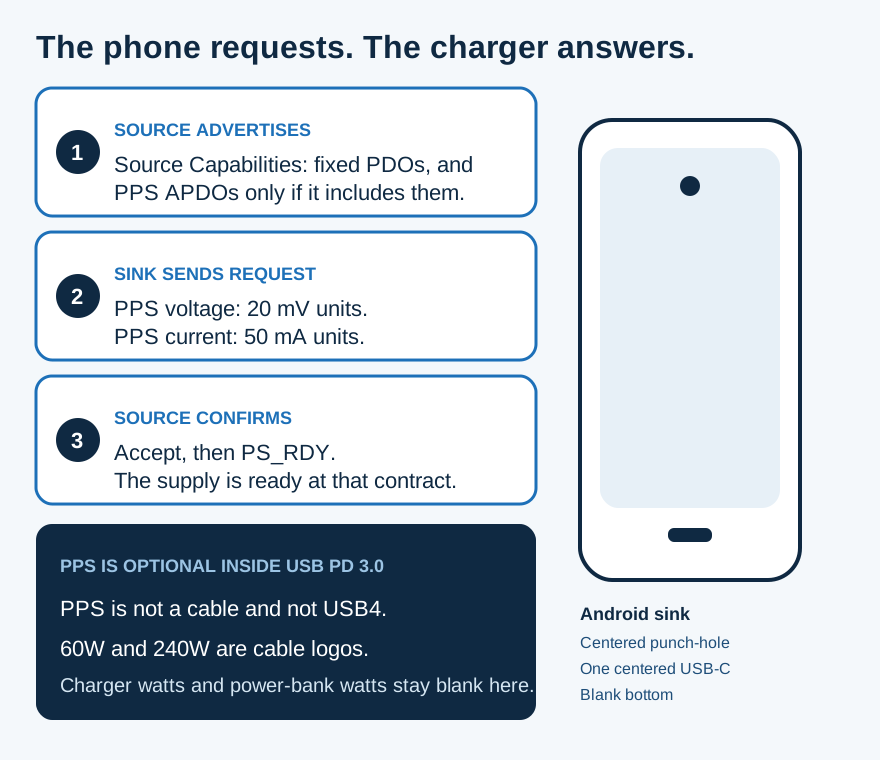
Figure 1. Section 1.5.1 of USB PD Revision 3.2 and the PPS Request fields in Table 6.21. The handset is a schematic: centered punch-hole, one centered USB-C, blank bottom.
Scroll horizontally to see all columns.
| Item | Printed value | Why it matters |
|---|---|---|
| PPS | Optional Programmable Power Supply feature of USB PD 3.0 | Host, device, and charger each have to support it |
| PPS Request | Voltage in 20 mV units. Current in 50 mA units. Inside the advertised minimum and maximum | The phone names a point. It does not take the headline wattage |
| 9V Prog window | 5 V to 11 V | Table 4.2. A fixed 9 V PDO is a different object |
| 15V Prog window | 5 V to 16 V | Table 4.2 |
| 20V Prog window | 5 V to 21 V | Table 4.2 |
| PDP at 15 W and below | PPS Prog columns marked not allowed | A fixed PDO contract can still exist |
| Cable logos | 60W or 240W on a USB-C to USB-C cable | Not a charger rating and not a power-bank rating |
| PD 3.1 ceiling | Up to 240 W. Adjustable mode at 100 mV, from 15 V | That 2021 mode is not named PPS |
| Pixel speed path | PPS adapter 30 W or more, or other PD adapter 15 W or more | Speeds vary by Pixel phone. Not every Android phone |
| Phone intake | Left blank. Use the phone maker’s own page |
How the charger and the phone make a contract
The source advertises. The sink requests. The source accepts, then says the supply is ready.
Section 1.5.1 of the USB Power Delivery Specification, Revision 3.2, Version 1.2, August 2026, splits the opening into that order. On attach, the source provides a default contract at 5 V, at the current advertised by Rp on the configuration channel. It then sends Source Capabilities: voltage and current levels it can supply. The sink requests the option it wants. The source accepts that Request. It then indicates that it is supplying the agreed level. The glossary calls the result an explicit contract: an Accept from the source, in response to the sink’s Request, followed by PS_RDY when the supply is ready.
A Power Data Object (PDO) is one advertised option inside those Source Capabilities. Fixed PDOs are single voltages. The same specification’s examples in that section are 5 V, 9 V, 15 V, and 20 V. An Augmented Power Data Object (APDO) is the object used when the option is a range. PPS uses the SPR Programmable Power Supply APDO. SPR is the Standard Power Range: that mode negotiates with Source Capabilities and Request, not with the EPR messages. Extended Power Range is optional, for a port whose maximum PDP is above 100 W and at most 240 W.
PD Power (PDP) is the source’s output power, or the sink’s input power. Table 3.4 ties the PPS ranges a source must offer to that PDP. At a port maximum PDP of 15 W and below, the 9 V, 15 V, and 20 V Prog columns are marked not allowed. A small USB PD charger can still complete a fixed PDO contract. It does not gain a PPS contract from that table.
Rule of thumb: If port PDP is under 15 W, Table 3.4 blocks every PPS Prog column. Read a fixed PDO if that is all the sheet prints. Do not borrow a PPS window from a larger charger.
The same opening section lists USB4 Mode Entry as a later step, and only when the ports support it. That step is a data mode. USB-IF’s USB4 page describes the data architecture: two-lane operation on existing USB Type-C cables, and up to 80 Gbps on 80 Gbps certified cables. PPS is not on that page.
What the PPS Request is allowed to name
PPS is optional. Section 3.2.5.2 says so in those words. When a source includes it, the voltages and currents it must support are Table 3.4, and the voltage windows are Table 4.2.
The glossary definition is a power supply, operating in SPR mode, whose output voltage can be adjusted in small increments over its advertised range, with a programmable output current foldback. The capabilities sit in the SPR PPS APDO.
Table 6.21 is the Request the sink sends once that APDO is selected. The Output Voltage field is in 20 mV units. The voltage has to be at least the APDO minimum and at most the APDO maximum. The Operating Current field is in 50 mA units. It is the highest current the sink will draw, and it must not exceed the maximum current in the Source Capabilities. When the sink’s need changes, it sends a new Request.
Table 4.2 prints three windows:
Scroll horizontally to see all columns.
| Prog name | Minimum | Maximum |
|---|---|---|
| 9V Prog | 5 V | 11 V |
| 15V Prog | 5 V | 16 V |
| 20V Prog | 5 V | 21 V |
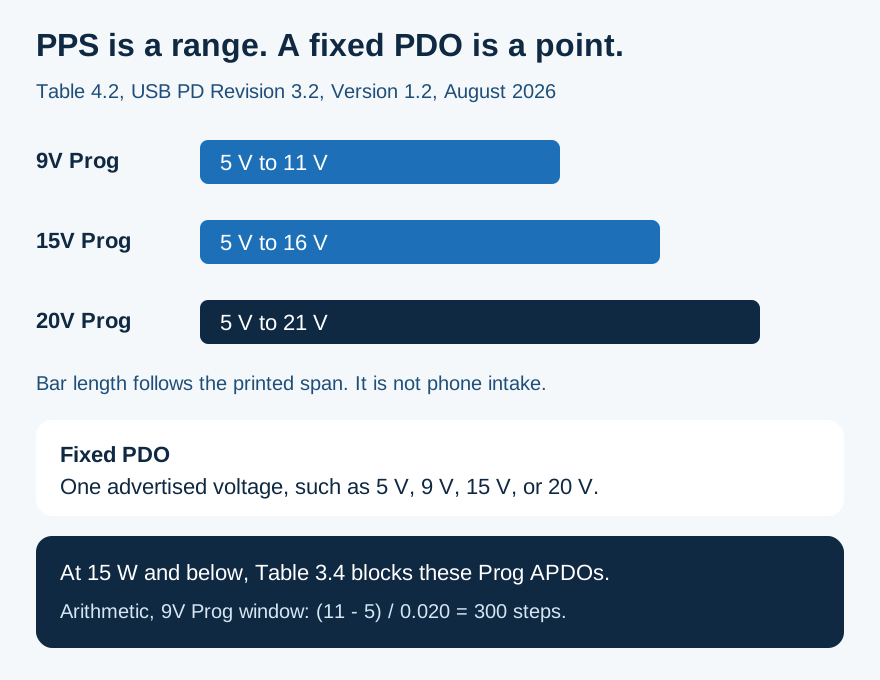
Figure 2. The bars are Table 4.2. The 300-step line is arithmetic on the 9V Prog window and the 20 mV Request unit. It is not a phone specification.
A fixed 9 V PDO and a 9V Prog APDO are neighbors, not copies. The PDO is one voltage. The Prog object is the window from 5 V to 11 V. The same split holds at 15 V and 20 V.
The 9V Prog window is 6 V wide. The Request quantizes voltage in 20 mV units, which is 0.020 V:
(11 - 5) / 0.020 = 300
That is 300 steps from the minimum to the maximum. Counting both endpoints, the same window holds 301 values. Both figures are arithmetic on Table 4.2 and Table 6.21. They become available only when the charger actually advertises that window.
Table 3.4 also prints a few exact currents, so the formula can be checked against a cell instead of invented. At a port maximum PDP of 27 W the 9V Prog cell is 3 A. The note says the maximum current is RoundDown(PDP ÷ Prog voltage) to the nearest 50 mA:
27 ÷ 9 = 3
Three amps is already on a 50 mA boundary, and it matches the printed cell. At 100 W the 20V Prog cell is 5 A, and 100 ÷ 20 = 5, again matching the cell. The cells between those rows are printed as PDP divided by 9, 15, or 20. This page leaves those in-between cells as the formula. It does not fill them with a sample PDP the table does not print.
Two other adjustable modes use different steps, and neither is this Request.
USB-IF’s charger page describes an adjustable voltage supply mode in which the powered device requests intermediate voltages between 15 V and the charger’s maximum available fixed voltage. The USB Promoter Group announcement of 26 May 2021 names that mode and gives it a 100 mV resolution, from 15 V up to 28 V, 36 V, or 48 V. The PDF does not use the name PPS. It does say Revision 3.1 enables up to 240 W, that USB PD was previously limited to 100 W via 20 V on Type-C cables rated at 5 A, and that the new fixed voltages are 28 V (above 100 W), 36 V (above 140 W), and 48 V (above 180 W). The charger page, separately, says those fixed voltages enable up to 140 W, 180 W, and 240 W. Keep each sentence with its page. The 240 W ceiling is a PD power limit. It is not the 240W cable logo.
While PPS is in current-limit operation, section 4.1.3.2 says the voltage might not move to the newly requested level, because the source is controlling current and the sink, usually its battery, sets the voltage. The source is not supposed to decide that the supply is ready by looking at VBUS. A meter photo of the cable is a poor substitute for the printed range.
Where each label fails
The dominant failure mode is a crossed label: a cable logo read as a charger, a charger wattage read as PPS, or a USB4 badge read as either.
Scroll horizontally to see all columns.
| Label | What the source prints | Dominant failure mode | Prevention |
|---|---|---|---|
| Fixed PDO | One voltage in Source Capabilities | The phone’s fast mode needs a PPS window the charger never advertises | Copy the PPS line. Leave it blank when it is absent |
| PPS Request | 20 mV voltage units and 50 mA current units, inside the advertised window | A current from one printed range paired with the voltage from another | Keep each range with the current printed beside it |
| Current-limit PPS | The battery can set the voltage while the source limits current | Treating one measured voltage as the contract you bought | Buy from the printed range, not from a meter snapshot |
| 2021 adjustable mode | 15 V upward, 100 mV steps, not named PPS | Calling every adjustable line PPS | Keep the 20 mV PPS Request as its own row |
| Cable logo | 60W or 240W on the USB-C to USB-C cable | Using that logo as the charger rating, the power-bank rating, or as PPS | Read the logo on the cable. Read PPS on the charger |
| USB4 | Data architecture, up to 80 Gbps on 80 Gbps certified cables | A listing that pairs the USB4 name with a PPS claim | PPS stays in USB PD 3.0 |
USB-IF’s cables and connectors page says that, to pass the compliance program, USB-C to USB-C cable categories must be labeled 60W or 240W with the power icon or logo. The page’s own example is a USB 20 Gbps cable that supports 20 V at 3 A. That cable must carry the combined 20Gbps/60W logo. A certified cable does not add capability to the products on either end. The USB-C cable guide is the next page when that same cable also has to carry files, a display, or Android Auto.
Captive leads, the ones molded into a charger, are outside that logo program. USB-IF says they are not eligible for cable certification. Read a captive lead on the charger label.
Worked example: three PPS lines, one port
Samsung’s Singapore page, “How to enable Fast charging and Fast wireless charging on your Samsung Galaxy phone,” prints official wired-charger rows and warns that official chargers vary by country. For Super Fast Charging it says to check USB PD PPS, not only the maximum output. A high maximum can still leave Super Fast Charging unavailable when PPS is missing.
The worked example uses EP-T6530, the row Samsung labels as a 65W trio-port PD charger. On USB-C1 the PPS lines are:
- 5 V to 11 V / 3.5 A
- 5 V to 16 V / 2.8 A
- 5 V to 20 V / 2.25 A
Power at the top of a printed pair is:
P = V × I
11 × 3.5 = 38.5
16 × 2.8 = 44.8
20 × 2.25 = 45
Those three products are arithmetic on the endpoints Samsung printed. Samsung’s support cell for this model says Super Fast Charging 2.0, based on use with a 45W, 5A cable, supported only on Port 1, and not supported when two or more ports are connected. For Galaxy S25 and later, the same cell says SFC 2.0 is supported with the 3A USB cable included with the device. The 45 in the third product lines up with that 45W condition as arithmetic. It is not a measurement of a phone, and it is not the 60W or 240W cable logo.
The crossed pair is the failure. Nothing on the row prints 20 V together with 3.5 A.
20 × 3.5 = 70
That 70 is arithmetic on two numbers Samsung did not publish as a pair. It is not an output.
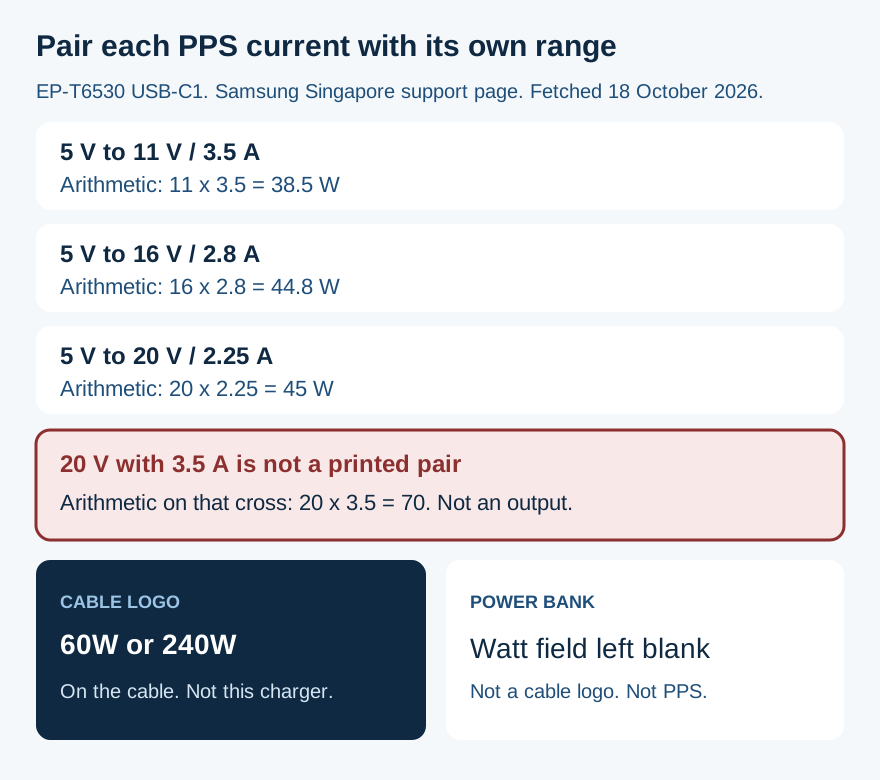
Figure 3. Arithmetic on Samsung’s USB-C1 PPS lines for EP-T6530. The 70 W cross is not on the page. Fetched 18 October 2026.
USB-C2 on the same model prints a smaller PPS pair, 5 V to 11 V / 2.25 A, plus a short 5 V to 5.9 V / 3 A line. The USB-A port prints 9 V / 1.67 A and no PPS line. Port 2 and the USB-A port are not the Super Fast Charging 2.0 path in that support cell.
A second Samsung row shows the same arithmetic landing on a charger label that shares a number with the cable logo. EP-T6010 is labeled a 60W PD charger. Its Super Fast Charging cell prints PDO 9 V, 15 V, 20 V / 3 A, and PPS 5 V to 20 V / 3 A. The support note says Super Fast Charging 3.0 based on a 60W, 3A cable.
20 × 3 = 60
That 60 matches the watt figure in Samsung’s model label and in Samsung’s cable note. USB-IF’s cable example also multiplies 20 V by 3 A and gets the 60W logo. Same arithmetic, two objects. The logo belongs on the cable. The 60W on EP-T6010 belongs on that charger. A power bank is a third object. This page does not print a power-bank wattage, so that cell stays blank.
EP-T2510, labeled a 25W PD charger, prints PPS from 3.3 V. Table 4.2 in Revision 3.2 starts the Prog windows at 5 V. This page does not force those two prints onto one row. Copy the range on the charger you are holding.
For the phone’s own intake, use the wattage guide. The intake cell above is blank on purpose.
What a phone maker actually names
Google’s page “Fix a Pixel phone that won’t charge or turn on,” fetched 18 October 2026, puts the speed path in one place. For the best battery experience and charging speeds, use a Google 30 W USB-C power adapter or another PPS adapter rated for 30 W or more. Other USB PD adapters should be rated for 15 W or more. Speeds vary by Pixel phone. That page is a Pixel troubleshooting instruction. It does not set a wattage for every Android phone, and it does not print a PPS voltage window.
Samsung’s note is the other direction. Super Fast Charging looks for PPS on the charger even when the maximum output is already high. The GaN charger guide keeps the semiconductor name off this protocol line. Gallium nitride does not add a PPS window.
A laptop USB-C port is a different supply from a laptop USB-C wall charger. The laptop charger guide separates that port ceiling from the brick. Bring the PPS question back here when the brick’s sheet prints both “PD” and “PPS.”
If the phone is still slow after the PPS line and the cable logo both match the phone maker’s note, change one part at a time with the slow-charging check.
Before you buy, copy four fields into the compatibility checklist:
- The phone’s named mode, and any watt figure that page actually prints.
- The charger’s fixed PDO list and its PPS ranges, each current kept with its own voltage window. Leave PPS blank when the sheet omits it.
- The cable logo, 60W or 240W, read on the cable. A captive lead has no such logo.
- The port, and whether a second device removes the mode, as Samsung prints for EP-T6530 Port 1.
When this check does not apply
Skip the PPS Request when the phone is on a wireless pad. This contract is a USB-C wire.
Skip the 60W and 240W logo rule for a captive lead molded into the charger. Read that assembly on the charger label.
Skip Table 4.2 as a description of a retail sheet that prints a different window, such as a range that starts at 3.3 V. The table is the specification window. The retail line is what that charger advertised.
Sources and verification
- USB-IF, USB Power Delivery Specification, Revision 3.2, Version 1.2, August 2026, local PDF. Section 1.5.1 negotiation. Explicit-contract glossary. PPS definition. Section 3.2.5.2 and Table 3.4. Table 4.2 windows. Table 6.21 Request fields. Section 4.1.3.2 current-limit note. PD Power glossary.
- USB-IF, Certified USB Fast Charger initiative, fetched 18 October 2026. PPS is the Programmable Power Supply feature of USB Power Delivery 3.0. Hosts, devices, and chargers. Backward compatible with USB Type-C and USB Power Delivery devices. The saved page prints no calendar date.
- USB-IF, USB Charger (USB Power Delivery), fetched 18 October 2026. Up to 240 W. Earlier 100 W at 20 V on 5 A cables. Fixed 28 V, 36 V, and 48 V enable up to 140 W, 180 W, and 240 W. Adjustable mode from 15 V. Each device takes only the power it requires.
- USB Promoter Group, USB PD 3.1 announcement, 26 May 2021. Up to 240 W. Earlier 100 W via 20 V on 5 A cables. Fixed 28 V, 36 V, and 48 V. Adjustable mode at 100 mV. The PDF does not use the name PPS.
- USB-IF, Cables and Connectors, fetched 18 October 2026. 60W and 240W cable logos. Example: 20 V at 3 A, marked 20 Gbps/60W. A certified cable does not augment the products. Captive cables are ineligible.
- USB-IF, USB4, fetched 18 October 2026. Data architecture. Up to 80 Gbps on 80 Gbps certified cables. PPS is not defined on this page.
- Google, Fix a Pixel phone that won’t charge or turn on, fetched 18 October 2026. PPS adapter 30 W or more, or other PD adapter 15 W or more. Speeds vary by Pixel phone.
- Samsung Singapore, How to enable Fast charging and Fast wireless charging, fetched 18 October 2026. PPS requirement for Super Fast Charging. EP-T6010 and EP-T6530 rows. Official chargers vary by country.
Checked 18 October 2026. Diagrams are explanatory. No charge-rate measurement is claimed.
Related articles
What Is a GaN Charger and Does It Work With Android?
GaN is the semiconductor in the adapter. PPS is a USB PD 3.0 feature. A 60 W or 240 W mark on a USB-C cable is a cable logo, not the charger rating.
Read article
Can You Use a Laptop USB-C Charger With an Android Phone?
A laptop USB-C wall charger and the laptop USB-C port are different supplies. Compare Dell's 15 W port ceiling, Lenovo 20 V input, PPS, and the 60 W cable logo.
Read article
Why Is My Android Phone Charging Slowly? A Practical Check Order
Separate a charge limit, heat protection, a bad cable seat, and a wireless alignment problem before you replace the adapter.
Read article