
USB-C Hub for Android: PD Pass-Through Math, OTG SSD Power, and exFAT Storage
Size a 100W USB-C PD pass-through hub for Android by subtracting the 7.5W–15W hub reserve, preventing NVMe SSD VBUS brownouts, and formatting drives as exFAT.
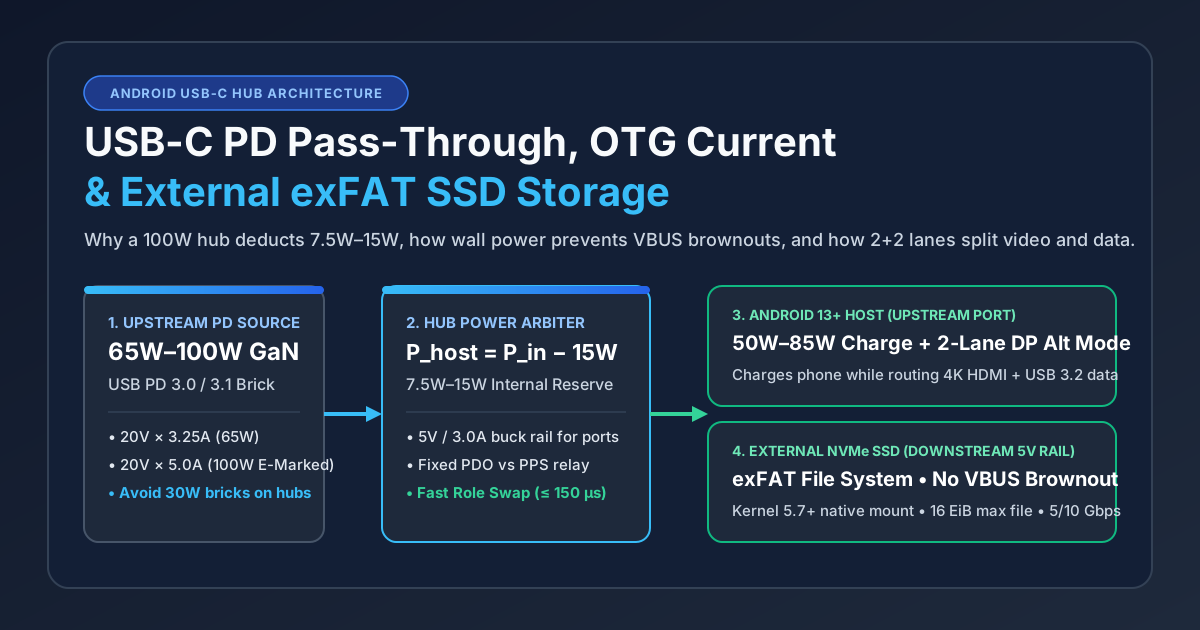
A self-powered USB-C PD charge-through hub splits wall power between its own 7.5W–15W downstream rail and the Android phone's charging contract.
Plugging a high-speed NVMe SSD and an HDMI monitor into an unpowered USB-C hub for Android drops the 5V bus below 4.50V and unmounts your drive mid-write. Pairing a 100W-rated hub with a small 30W phone brick also fails to deliver fast charging because the hub subtracts 7.5W to 15W from the wall adapter before advertising the remaining power contract to the handset.
To run an external SSD, HDMI display, and fast charging simultaneously on an Android phone or tablet, pair a USB-C Power Delivery (PD) pass-through hub with a 65W or 100W PD 3.0 wall charger (P_host = P_adapter − P_hub_reserve), format portable drives above 32 GB as exFAT (supported natively in Android 13+ on Linux 5.7+ kernels), and select a hub wired for 2-lane DisplayPort Alt Mode plus 2-lane SuperSpeed USB 3.2. Browse the complete Android accessories collection and Android charging guides to match cables, adapters, and handset ports before ordering.
Updated October 25, 2026.
Scroll horizontally to see all columns.
| Hardware Subsystem | Bus-Powered OTG Mode | Self-Powered PD Hub (65W–100W Brick) | Dominant Failure Mode and Prevention |
|---|---|---|---|
Upstream Charging (P_host) |
Phone battery drains (−4.5W to −7.5W) |
Deducts 7.5W–15W reserve; passes 50W–85W to phone |
A 30W brick leaves only 15W (5V × 3A) after hub reserve; use a 65W or 100W brick |
| Downstream 5V Rail | Capped at 5V × 0.9A (4.5W) to 5V × 1.5A (7.5W) |
Regulated by hub buck rail at 5V × 1.5A–3.0A (7.5W–15W) |
Unpowered NVMe SSD burst writes (6W–11W) drop VBUS below 4.50V; keep PD power attached |
Wall Unplug (FRS) |
Runs on phone battery VBUS | 300–1,500 ms drop on standard hubs; ≤ 150 µs on FRS hubs |
Pulling power on a non-FRS hub resets ports and corrupts writes; unmount storage first |
File System (vold) |
FAT32 or exFAT |
exFAT (16 EiB max file) on Android 13+ / Linux 5.7+ |
NTFS triggers "Unsupported USB drive"; format SSDs as exFAT (128 KB cluster size) |
| USB-C Lane Split | Up to 4 lanes USB 3.2 without video | Pin Assignment D (2-lane DP + 2-lane USB 3.2) vs. C (4-lane DP + USB 2.0) |
4-lane DP 1.2 4K 60Hz hubs cap SSDs at USB 2.0 (~40 MB/s); pick a DP 1.4 2-lane hub |
How USB-C PD Pass-Through Math Actually Works
A multiport USB-C hub labeled "100W PD Pass-Through" is not a passive splice wire. Under the USB-IF Power Delivery 3.0 and 3.1 architecture, a charge-through hub acts as a dual-role power arbiter with two independent PD controllers: the downstream receptor (UFP charge port) sinks power from your wall charger, and the upstream captive cable (DFP host port) advertises a recalculated list of Power Data Objects (PDOs) to your Android phone.
Before offering power to the handset, the hub’s policy engine subtracts a static reservation (P_hub_reserve) of 7.5W (5V × 1.5A) to 15W (5V × 3.0A) to feed its step-down buck regulator, USB 3.2 hub ASIC, HDMI 2.0 bridge, SD card reader, and downstream USB ports.
Formula: P_host_available = P_adapter_input − P_hub_reserve
Worked example: Connect a multiport hub that reserves 15W for its downstream 5V rail:
- With a 30W phone charger:
30W − 15W = 15Wmaximum advertised to the phone (5V × 3.0Aor9V × 1.67A). - With a 65W laptop PD charger:
65W − 15W = 50Wadvertised to the phone (9V × 3.0A,15V × 3.0A, or20V × 2.5A), funding fast phone charging and the 15W peripheral rail simultaneously.
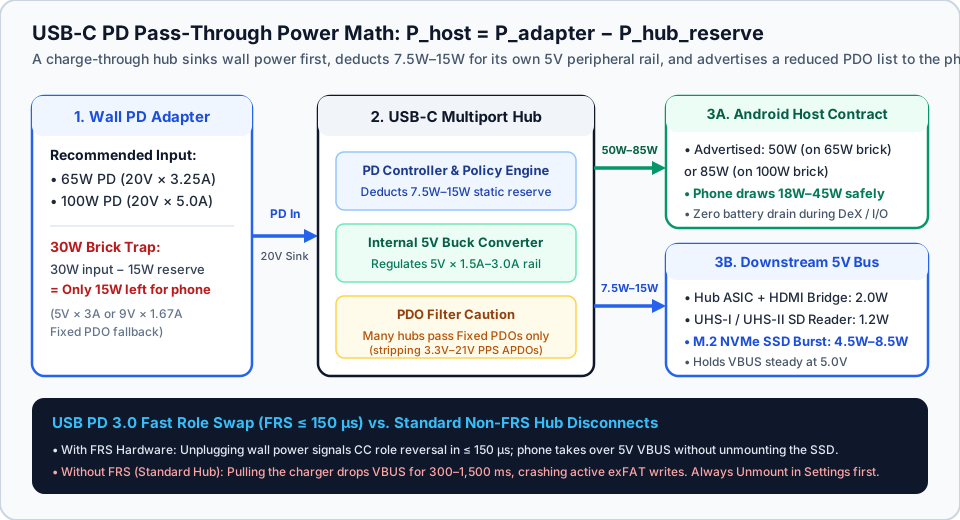
Two protocol behaviors explain why charging through a hub often runs slower than plugging the same brick directly into the phone:
- Fixed PDO Relay vs. PPS Stripping: Flagship Android phones—including Samsung 25W/45W Super Fast Charging models and Google Pixel 8, 9, and 10 phones covered in Google’s Pixel power adapter documentation—rely on Programmable Power Supply (PPS) Augmented PDOs (
3.3V–11Vor3.3V–21Vin20 mVsteps) for peak charging wattage. Many multiport hubs only forward Fixed PDOs (5V,9V,15V,20V) across their internal PD bridge and strip PPS APDO messages. When PPS is stripped, a Samsung or Pixel phone falls back to a15W(5V × 3A) or18W(9V × 2A) Fixed PD profile. Compare these two contracts in our USB PD vs PPS technical breakdown. - Input Voltage Rail Scaling: A
30Wcharger typically tops out at9V × 3A(27W) or15V × 2A(30W). Once a hub deducts15W, it downgrades the upstream advertisement to5V × 3A(15W). Stepping up to a 65W or 100W laptop USB-C charger, a multiport GaN USB-C charger, or a high-output portable phone charger for Android with 5A/21V PPS feeds a20V × 3.25A(65W) or20V × 5.0A(100W) rail into the hub so the phone’s9Vor15Vcontract never throttles.
Scroll horizontally to see all columns.
| Upstream Wall Adapter | Hub Reserve (P_hub_reserve) |
Max Power to Phone (P_host) |
Phone Charging Contract Through Hub | Downstream SSD + HDMI Stability |
|---|---|---|---|---|
| None (Unpowered OTG) | 0W from wall (1.5W–2.5W from phone) |
−4.5W to −7.5W (battery drains) |
Discharging (5V sourced by phone PMIC) |
Unstable for NVMe SSDs; brownout below 4.50V on burst writes |
| 18W–20W PD Brick | 7.5W–15W |
3W–10.5W (5V × 0.5A–2.0A) |
Slow charging warning (5W–10W) |
Marginal; hub may reject pass-through or drop VBUS under load |
| 30W PD / PPS Brick | 15W |
15W (5V × 3.0A or 9V × 1.67A) |
Standard 15W Fixed PD (PPS usually stripped) |
Stable for 1 SSD, but phone charges at half speed |
| 45W PD / PPS Brick | 15W |
30W (9V × 3.0A or 15V × 2.0A) |
18W–27W Fixed PD (or 25W+ with PPS relay) |
Stable for NVMe SSD + HDMI monitor + SD card reader |
| 65W–100W GaN PD Brick | 15W |
50W–85W (9V/15V/20V up to 4.25A) |
Full Fixed PD (18W–27W) or full PPS on PPS hubs |
Maximum stability; 15W (5V × 3A) downstream rail isolated |
Rule of thumb: Pair any multiport USB-C PD hub with a wall adapter rated at least 20W to 30W higher than your phone’s normal charging draw (≥ 65W recommended). If your handset still charges slowly through a dock, isolate the brick, cable, and hub deduction using our Android slow-charging diagnostic steps.
Why External NVMe SSDs Disconnect on Bus-Powered OTG
When you plug a USB-C hub into an Android phone without a wall charger on the hub’s PD input, the setup runs in bus-powered USB On-The-Go (OTG) mode. As defined in the USB Type-C Cable and Connector Specification and Android’s USB Host overview, the handset’s Type-C controller asserts a source role (DFP with an Rp pull-up resistor on CC) and uses its internal battery boost converter to drive 5V onto VBUS. For Rd (5.1 kOhm) pull-down detection and five-unit-load hub rules, see our Android USB OTG pre-purchase guide.
Because a smartphone runs off a single-cell lithium-ion battery (3.7V–4.4V), its Power Management IC (PMIC) strictly limits VBUS output current:
- Standard USB 3.2 Type-C host floor:
5V × 0.9A = 4.5W(900 mA). - Typical flagship Android OTG ceiling:
5V × 1.5A = 7.5W(1,500 mA).
A USB 2.0 flash drive draws only 100–250 mA (0.5W–1.25W) and runs on battery power. A multiport hub paired with a USB 3.2 Gen 2 (10 Gbps) M.2 NVMe SSD enclosure imposes a much heavier load:
Formula: I_total_VBUS = I_hub_ASIC + I_HDMI_bridge + I_SD_reader + I_SSD_peak
Worked example: During a 4K ProRes video export or multi-gigabyte copy onto an M.2 NVMe SSD through an unpowered hub:
- Multiport USB 3.2 Hub ASIC + HDMI bridge:
400 mA(2.0Wat5V) - M.2 NVMe SSD + Gen 2 bridge IC during SLC cache burst write:
1,250 mA(6.25Wat5V) - Total current demand:
400 mA + 1,250 mA = 1,650 mA(1.65A=8.25Wat5V)
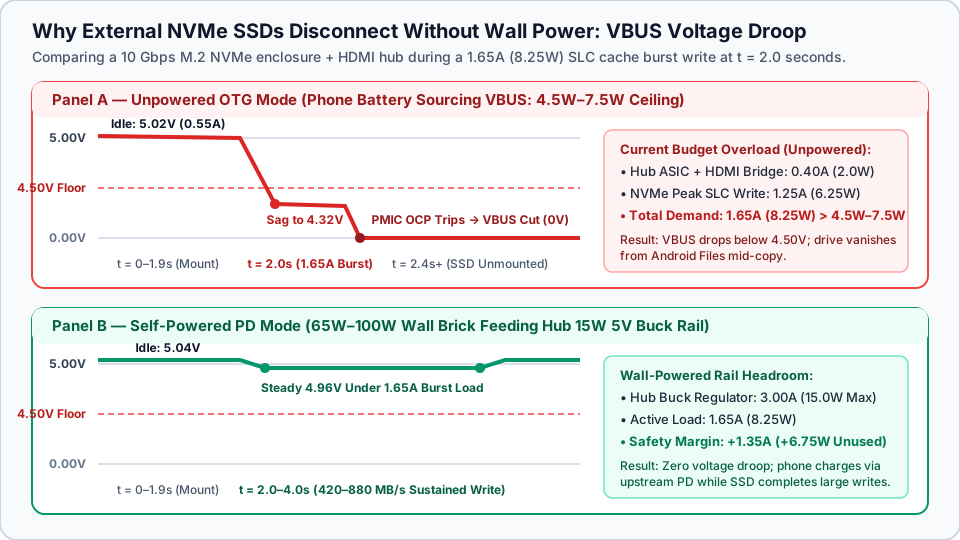
When sequential write current spikes to 1.65A (8.25W), two failures occur:
- IR Voltage Droop Below 4.50V: Across the phone’s boost switch, Type-C pins, hub cable, and port switch, VBUS sags below
4.50V(the minimum peripheral operating threshold), causing the NVMe bridge controller (RTL9210,JMS583, orASM2362) to brown out and reset. - PMIC Over-Current Protection (OCP) Trip: The phone’s PMIC detects current above its
0.9A–1.5Aceiling, opens the VBUS switch (0V), and drops the USB tree—unmounting the SSD mid-copy.
Scroll horizontally to see all columns.
| Attached Peripheral Component | Idle Current (5V) | Peak Burst Current (5V) | Peak Power (5V × I) |
Safe on Unpowered Phone OTG (4.5W–7.5W)? |
|---|---|---|---|---|
| USB 3.2 Flash Thumb Drive | 60–100 mA |
200–350 mA |
1.0W–1.75W |
Yes (even on a passive adapter) |
| Multiport Hub Base (ASIC + HDMI Idle) | 250–350 mA |
350–500 mA |
1.75W–2.50W |
Uses 35%–55% of phone OTG budget before drives attach |
| UHS-I / UHS-II SD Card Reader | 40–80 mA |
180–280 mA |
0.90W–1.40W |
Safe alone; risky alongside an SSD |
Portable 2.5-inch SATA SSD (5 Gbps) |
150–220 mA |
450–750 mA |
2.25W–3.75W |
Borderline on a multiport hub (4.0W–6.25W total) |
M.2 NVMe SSD Enclosure (10 Gbps) |
220–320 mA |
900–1,700 mA |
4.50W–8.50W |
No (6.25W–11.0W with hub trips OCP brownout) |
| Portable 2.5-inch Mechanical HDD | 300–450 mA |
850–1,200 mA |
4.25W–6.00W |
No (spin-up inrush drops VBUS on startup) |
Connecting a 65W or 100W USB-C PD charger to the hub’s PD port shifts the downstream 5V rail onto the hub’s 5V × 3.0A (15W) buck converter, isolating SSD burst current from the phone battery. Likewise, Samsung’s DeX setup documentation recommends keeping an external PD charger attached whenever a multiport adapter drives HDMI video and USB storage together.
Fast Role Swap (FRS ≤ 150 µs): Why Unplugging the Wall Charger Unmounts Your Drive
A second power failure happens if you pull the wall charger cord out of a powered hub while an external SSD is still mounted.
When wall power is attached, the hub sources VBUS to both the phone and the SSD. If you yank the wall plug out of a standard non-FRS hub:
- The hub’s 5V buck converter loses its 20V input and VBUS drops to
0Von all ports. - Only after VBUS stays at
0Vfor300 ms to 1,500 msdoes the hub reset its CC state machine so the phone can detect charger removal and turn on its own 5V OTG supply. - That
300–1,500 mspower blackout crashes the external SSD and leaves openexFATallocation bitmaps dirty.
To prevent this crash, the USB-IF Power Delivery 3.0 specification defines Fast Role Swap (FRS). When an FRS hub senses upstream wall power failing, it signals role reversal on the USB-C CC wire and swaps the Android host from Sink to Source in 150 microseconds (150 µs) or less, holding VBUS above minimum operating voltage.
Rule of thumb: Unless your hub supports USB PD 3.0 Fast Role Swap (FRS) and total peripheral draw fits within the phone’s battery limit, never unplug wall power while a drive is mounted. Follow AOSP’s portable storage ejection workflow:
- Close any app writing to the drive.
- Open Settings → Storage and tap Eject / Unmount next to the USB drive.
- Wait for
"Safely ejected"before unplugging the wall charger or hub.
Formatting External SSDs for Android: exFAT vs. FAT32 vs. NTFS
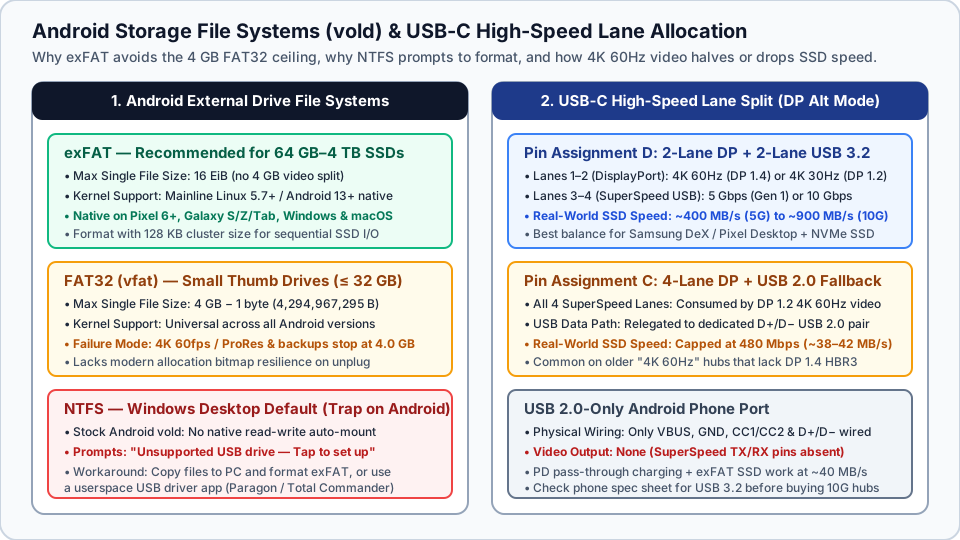
Android’s storage daemon (vold) must also support the drive’s partition format. Under the Android Open Source Project (AOSP) storage architecture, Android mounts portable USB volumes through kernel filesystem drivers managed by vold and exposes them via the Storage Access Framework (SAF).
External drives fall into three file-system regimes on Android:
exFAT(Recommended for All SSDs and Drives ≥ 64 GB):- Supports single files up to
16 EiB, eliminating the 4 GB video split limit. - Following Samsung’s mainline
exFATdriver merge in the Linux 5.7 kernel release, Android 13+ devices on Linux5.10+kernels—including Google Pixel 6 and newer and Samsung Galaxy S, Note, Z Fold, Z Flip, and Tab S devices—mountexFATnatively in kernel space with full read/write speed across Android, Windows, and macOS.
- Supports single files up to
FAT32(vfat— Legacy Thumb Drives ≤ 32 GB Only):- Universally supported across all Android versions, but its 32-bit file size header enforces a hard ceiling of
4,294,967,295 bytes(4 GB minus 1 byte). Recording 4K 60fps / ProRes video or exporting a10 GBbackup ontoFAT32aborts or splits at4.0 GB.
- Universally supported across all Android versions, but its 32-bit file size header enforces a hard ceiling of
NTFS(Windows Desktop Format — Not Mounted by Stock Androidvold):- Stock Android
volddoes not include an in-kernel read/writeNTFSauto-mounter. Plugging a WindowsNTFSSSD into a Pixel or Galaxy phone triggers"Unsupported USB drive — Tap to set up", which offers to Format (erase) the drive. - To keep existing
NTFSfiles, copy them to a PC and reformat the drive asexFAT(128 KBallocation unit size for 1 TB–4 TB SSDs), or read the drive through a third-party app with a userspaceUsbManagerdriver (such as Paragon exFAT/NTFS or Total Commander USB plugin).
- Stock Android
Scroll horizontally to see all columns.
| File System | Max Single File Size | Max Volume Size | Native Android 13+ (vold) Support |
Desktop OS Support | Best Use Case on Android |
|---|---|---|---|---|---|
exFAT |
16 EiB |
128 PiB |
Native Read/Write (Linux 5.7+ / Pixel 6+ / Galaxy) |
Read/Write on Windows, macOS, Linux 5.7+ |
External NVMe/SATA SSDs (64 GB–4 TB), 4K/8K video, backups |
FAT32 (vfat) |
4 GB − 1 byte (4,294,967,295 B) |
2 TB (32 GB in Windows GUI) |
Native Read/Write (all Android versions) | Read/Write on Windows, macOS, Linux, car units | Small thumb drives (≤ 32 GB), firmware sticks, small files |
NTFS |
16 TiB–8 PiB |
16 TiB–8 PiB |
Unsupported by vold ("Unsupported USB drive") |
Read/Write on Windows; Read-Only on macOS | Avoid for native Android use; reformat to exFAT on PC |
ext4 |
16 TiB |
1 EiB |
Blocked/root-only for portable OTG drives in stock vold |
Native on Linux; extra tools on Windows/macOS | Internal OS partitions only; unsuitable for OTG sharing |
HDMI Video + Fast Storage at the Same Time: 2-Lane vs. 4-Lane USB-C Hub Traps
To run an external monitor (Samsung DeX or Pixel desktop mirroring) and copy files to an NVMe SSD simultaneously, inspect how the phone and hub split the USB-C connector’s four high-speed differential pairs (TX1/RX1 and TX2/RX2).
Under the VESA DisplayPort over USB-C specification, a multiport dock uses one of two pin assignments when a monitor is active:
- VESA Pin Assignment D (2-Lane DP + 2-Lane SuperSpeed USB 3.2):
- Two lanes carry DisplayPort video while two lanes carry USB 3.2 Gen 1 (
5 Gbps, ~400 MB/s) or Gen 2 (10 Gbps, ~850–950 MB/s). - With DisplayPort 1.4 (HBR3 at
8.1 Gbpsper lane), 2 lanes deliver16.2 Gbpsof video bandwidth—driving4K 60HzHDMI and5/10 GbpsUSB 3.2 SSD storage simultaneously. With older DP 1.2 (HBR2 at5.4 Gbpsper lane) silicon, 2-lane hubs cap video at4K 30Hz(or1080p/1440p 60Hz) while preserving5 GbpsSSD speed.
- Two lanes carry DisplayPort video while two lanes carry USB 3.2 Gen 1 (
- VESA Pin Assignment C (4-Lane DP + USB 2.0 Fallback Trap):
- Older
"4K 60Hz"hubs using DP 1.2 HBR2 (4 × 5.4 Gbps = 21.6 Gbps) route all four SuperSpeed lanes to video, forcing every USB port onto the dedicated USB 2.0 (D+/D−) pair at480 Mbps(38–42 MB/sSSD speed).
- Older
Also verify your phone’s USB-C wiring. Handsets wired only for USB 2.0 High-Speed omit the SuperSpeed TX/RX pins: they support PD pass-through charging and exFAT drives at USB 2.0 speeds (~40 MB/s), but cannot output HDMI video. Check your model on our USB-C DisplayPort Alt Mode Android phone support list and Android USB-C video output guide.
5-Minute Pre-Purchase and Desk Verification Checklist
Before ordering a USB-C hub or troubleshooting an external SSD that refuses to stay mounted on your Android phone, run through this five-step hardware check and log the setup on your Android device compatibility checklist:
- Verify Handset Port Generation and OS Kernel: Confirm whether your phone’s USB-C port is wired for USB 3.2 Gen 1/2 (required for
400–900 MB/sSSD transfers and DisplayPort Alt Mode video) or USB 2.0 (~40 MB/sdata only, no HDMI). Confirm the phone runs Android 13 or newer (Linux5.10+) for native in-kernelexFATmounting. - Size the Wall Charger with the
P_adapter − 15WRule: Pair any multiport hub with a 65W or 100W USB-C PD 3.0/3.1 wall charger and a 100W E-Marked USB-C power cable from our USB-C cable selection guide or Android charging hub. Never rely on an unpowered OTG session or an 18W–30W phone brick when an M.2 NVMe SSD is attached. - Check the Hub’s Lane Split Specification: If you need both HDMI and fast storage, pick a hub rated for DP 1.4 (
4K 60Hz+ USB 3.25 Gbpsor10 Gbps) rather than a 4-lane DP 1.2 hub that forces USB ports down to USB 2.0 (480 Mbps). - Pre-Format New Drives as
exFAT(128 KBCluster Size): Format any SSD or flash drive larger than32 GBasexFATso 4K video recordings and backups never hit the4 GB − 1 byteFAT32wall, and convert desktopNTFSdrives before connecting them to Android. - Plug Power First, Unmount Storage First: Connect the 65W–100W wall charger to the hub’s PD port before plugging in your NVMe SSD, and always tap Settings → Storage → Eject / Unmount before unplugging wall power on any hub that lacks USB PD 3.0 Fast Role Swap (
FRS ≤ 150 µs).
Scroll horizontally to see all columns.
| Observed Symptom on Android | Root Hardware or OS Cause | Immediate Fix |
|---|---|---|
| SSD mounts briefly, then disconnects during copy | Unpowered OTG VBUS (4.5W–7.5W max) sags below 4.50V under 1.65A NVMe burst write, tripping PMIC OCP |
Plug a 65W–100W PD charger into the hub’s PD port so the 15W (5V × 3A) buck rail powers the SSD |
Phone says “Charging slowly” (15W) on a “100W” hub |
A 30W brick leaves only 15W after hub reserve (30W − 15W), or the hub strips PPS (3.3V–21V) APDOs |
Upgrade the wall brick to 65W+ PD; for 25W–45W PPS, choose a hub verified for PPS pass-through |
Notification says "Unsupported USB drive" |
Drive is formatted as desktop NTFS, which stock Android vold does not auto-mount |
Back up files on a PC and format the drive as exFAT (128 KB cluster size), or use a userspace UsbManager app |
4K video recording stops at 4.0 GB |
Drive uses FAT32 (vfat), which enforces a 32-bit file limit of 4,294,967,295 bytes (4 GB − 1 B) |
Copy files off the drive and reformat the volume from FAT32 to exFAT |
NVMe SSD copies at 38–42 MB/s with HDMI active |
Hub uses 4-lane DP Alt Mode (Pin Assignment C), or the phone’s USB-C port is wired for USB 2.0 only | Use a 2-lane DP 1.4 + 2-lane USB 3.2 hub, and confirm the phone supports SuperSpeed USB 3.2 |
| SSD warns of unsafely removed storage on charger unplug | Non-FRS hub drops VBUS for 300–1,500 ms while switching power roles back to phone battery |
Tap Settings → Storage → Unmount before pulling wall power, or use a USB PD 3.0 Fast Role Swap (FRS) hub |
Frequently asked questions
Why does my 100W USB-C hub only charge my Android phone at 15W or 18W?
A 100W pass-through label means the hub’s input port can accept up to 100W (20V × 5A) from a wall charger, not that it generates power or forwards 100% of a small brick’s wattage. The hub subtracts 7.5W to 15W for its own 5V peripheral rail before advertising the remainder to the phone, and many hubs strip Programmable Power Supply (PPS) messages down to Fixed 5V or 9V PDOs.
Can an Android phone power an external NVMe SSD without a powered USB-C hub?
Most smartphones limit unpowered OTG VBUS output to 4.5W (5V × 0.9A) or 7.5W (5V × 1.5A). When a 10 Gbps M.2 NVMe SSD enclosure and a multiport hub perform a sequential burst write, combined power reaches 6W to 11W, pulling VBUS below 4.50V and causing the phone’s protection circuit to drop the drive unless a PD wall charger is connected to the hub.
Should I format an external SSD as exFAT, FAT32, or NTFS for Android?
Format external SSDs and flash drives above 32 GB as exFAT. Android 13 and newer devices running Linux 5.7+ kernels mount exFAT natively with support for single files up to 16 EiB, whereas FAT32 blocks any single file larger than 4 GB minus 1 byte and stock Android refuses to auto-mount desktop NTFS volumes without third-party userspace driver apps.
Why does my external SSD disconnect when I unplug the charger from my USB-C hub?
When you pull the wall charger out of a standard USB-C hub that lacks USB PD 3.0 Fast Role Swap (FRS), the hub drops 5V VBUS across all ports for 300 to 1,500 milliseconds while renegotiating power roles with the phone. Unless your hub and phone both execute an FRS transition within 150 microseconds, you must eject the drive in Android Settings before disconnecting wall power.
Related articles
Mobile Gaming Controller: USB-C vs Bluetooth for Android
Compare USB-C and Bluetooth Android controllers by input path, game support and cooler clearance, with clear limits on latency and Hall-effect claims.
Read articleAndroid Auto GPS Wrong Location: Phone and Projection Checks
Diagnose an Android Auto Google Maps location issue by separating wrong blue-dot position, spinning compass beams, and unloaded routes while parked.
Read article
Can You Use a Laptop USB-C Charger With an Android Phone?
A laptop USB-C wall charger and the laptop USB-C port are different supplies. Compare Dell's 15 W port ceiling, Lenovo 20 V input, PPS, and the 60 W cable logo.
Read article